Showing posts with label EAI. Show all posts

Friday, January 2, 2009

Integration Projects Usual Madness

Joel Spolsky wrote a classical article about writing better code. The 12 Joel's rules are below summarized:
  1. Do you use source control?
  2. Can you make a build in one step?
  3. Do you make daily builds?
  4. Do you have a bug database?
  5. Do you fix bugs before writing new code?
  6. Do you have an up-to-date schedule?
  7. Do you have a spec?
  8. Do programmers have quiet working conditions?
  9. Do you use the best tools money can buy?
  10. Do you have testers?
  11. Do new candidates write code during their interview?
  12. Do you do hallway usability testing?
EAI projects pose additional serious challenges in terms of project management and quality assurance. Even if the term "EAI" seems to be out of fashion nowadays, I think the majority of projects which have been labelled as "SOA efforts" are, in facts, still plain, old EAI.

EAI Quality Assurance and Testing

Especially when doing EAI, unit testing is not enough. Joel is in favour of developer's unit testing and personally I think using a tool such as JUnit can prevent a huge numbers of bugs, but unit-testing integration flows is often much harder than unit-testing regular applications. This is due to the fact that when implementing EAI it is necessary to deal with a multitude of external systems which are out of our domain of control. Mocking those systems is often very hard or even impossible, it could lead to write and maintain more mocks than actually manageable and, additionally, the quality and realism of those mocks could be at least questionable.

Testing activities for EAI teams is a matter of organization and operations, because often it could be a cross-department issue. For example, testing SAP BAPI interfaces requires some commitment and lot of assistance from the SAP team, which in the meanwhile could have different priorities. The same for other legacy technologies. This clearly scales to a management issue, the EAI team has to be allowed to orchestrate the testing and validation process with all the involved external parties. Cross-department activities are usually difficult for organizational reasons, not much for technical ones.

Critical Success Factors


While at SeeBeyond we had some specifically integration-related rules, which were useful to establish what we called "Critical Success Factors":
  • The executive sponsorship must be established up front to facilitate timely decision making, appropriate resource allocation and removal of business barriers.
  • Establish an integration team with a balanced mix of IT, end business, management and consultants who will work together toward the main goal of a successful implementation
  • Provide just-in-time training and coaching to the appropriate people on operation of the product components, keeping them ahead of the learning curve,
  • Field level buy-in to the implementation is critical to the success of the project
  • Executive management must communicate their commitment to the new technology and illustrate this commitment through their actions.
  • Availability of key stakeholders to facilitate the decision making process and to keep the implementation moving forward.
  • A complete test and validation plan should prepared in advance. It is not up to the single developer to validate his own work, QA is an overall function.
  • As this is an integration project, all interfaces must be defined before starting the implementation.
  • Changes have to be accommodated into a change management process which takes care of the deadline. All the interfaces should be unit-testable and end-to-end testable as being part of a higher level process.
  • Implementation will proceed by very short iterations of analysis, design, development, test and deployment. At the end of each iteration a working prototype should be ready to run functional validation tests.
Regarding SOA, reports say that most SOA initiatives are failing because of inadequate business involvement and commitment. EAI is a better understood discipline (really?), but still projects tend to fail for exactly the same reason as newer SOA efforts.

Missing Deployment Plan

Just after the functional specs and scope, it is important to define a Deployment Plan and a Deployment Architecture:

"The deployment project plan establishes a baseline reference plan. It is your road map for the deployment project. The roles and responsibilities of each organization, the schedule of tasks, and any estimates must be defined in this plan.
[...]
Deployment Architecture (DA), together with Requirements Analysis, is the most important component of your plan, and should be documented carefully. Deployment begins when you plan and schedule how, in view of your analysis and allocated resources, you want to implement your environment. During this phase, you set up the operation procedure and schedule for the entire deployment project. DA provides guidance to the successive design and implementation phase, so DA creation always must precede it. In fact, developers needs to use the DA document as a guide for implementing their flows, adapting services communication to the DA. Of course, sometime it is necessary to adjust the DA to accommodate design needs emerging after some development, but if this happens frequently then it is a sign of a bad original DA, so it is time for a deep review.
Poor analysis and planning can cause major problems during the later phases. Thorough, comprehensive analysis and planning can make the deployment project easier, more efficient, and less costly.
"

The above is a mix of statements from the Java CAPS documentation plus some comments of mine.

Organizational Issues


In my experience most of the issue I have encountered during Integration projects are organizational and operational:
  • Lack of organizational information
  • No complete specifications
  • Not enough back-end information to fill the specifications
  • Lack of coordination
  • Frequent changes in project organization (document store moving, too many documents everywhere, anonymous doc.)
  • Huge integrations are thrown to single developers
  • Lack of commitment
  • Sometime is difficult to understand who is in charge
  • Developers are frustrated by changing deadlines
  • Bad or totally missing test data!!!
Missing Domain Model

You wouldn't write SQL queries before modelling any database relationship, would you?
An usual requirement for Services is to build first a Domain Model as a common, business oriented standard communication device. This is very close to good Object-Oriented programming practices, but Service-Oriented is focused on exchanging documents instead of objects. A domain model can be designed by normal entity-relationship diagrams and, for example, implemented through XML-Schemas.

Common Misunderstandings

  • Integration projects are like software development projects
>> No! they are very different!
>> Integration projects are cross-department projects
>> Need more involvement
>> Need more cross-management
  • Bugs in software are all the evil
>> No! Half of bugs are not real platform's bugs but behaviour due to bad design/assumption.

Integration project with any vendor will fail if there are no clear specifications...

Inter-team communication madness

  • Every team has its own life
  • Not coordinated at all
  • No motivations to help
  • Mostly Anonymous functional and technical documents !?!
Finally... Some Recommendations
  • Long term strategy but short delivery cycles
  • Top-down, business-driven analysis
  • Short iterations, deliver value within few weeks
  • Break big projects into smaller pieces
  • Stick to deadlines! Avoid changing a deadline!
  • Instead, what features can fit into the deadline?
  • Adopt a Project Management methodology!
Some of the above statements could seem controversial. What about deadlines? there is nothing more frustrating for a developer than working 80 hours per week, weekends also, just to discover that a couple of days before deployment some manager decides that the feature is not really that important and can be delayed. Boy, you are not going to catch me anymore! So my advice is: fix the deadline and instead move in and out features, keep the pace, sustain the mood.

Always ask ourself why? "Why?" is extremely powerful: before start fighting to solve a technical issue one should ask why I'm doing this? Is there any better, cleaner design which could alleviate or even cancel the technical issue? Do I really have all the necessary information? Am I answering a question nobody asked for?

Conclusions

Integration projects are somehow quite different from application development projects:
  • Interfaces and meta-data must be clearly defined
  • Service contracts must be defined (SLAs)
  • Test data must be readily available!
  • External systems experts must be available!
  • An architectural board in charge of taking decisions needs to be established.
It seems that the above list is exactly what we need in case of any project, application development or integration. But badly-managed dependencies with the external world can sink any integration project regardless of how good is the team and its internal process. Integration is about connecting existing interfaces: what can I do if interfaces are fuzzy and undefined? Frustration, that is....

Thanks goes to my friend Juraj Kazda of Sun, for discussing and writing down these issues while working together in several projects.

Saturday, March 29, 2008

Dynamic Data Models

A recent article on Infoq: Beyond SOA: A New Enterprise Architecture Framework for Dynamic Business Applications gives an interesting point of view about development of Enterprise Applications both from an architecture and a methodology perspective. Article's conclusions are:

"the evolution of flat, stateless, static, client-server web-based solutions have contributed to the disconnect between IT architecture and the real-world of hierarchical, stateful, dynamic, distributed business. We also discussed how traditional engineering approaches do not support the development of adaptive systems capable of supporting the dynamics of business."


A fundamental issue with present enterprise SOA is about the abuse of static data models. As the author explained, relational databases are for static data relationship, but only some parts of the enterprise ecosystem can be considered as being ruled by static relationships. For a more technical example, XML was supposed to be here to overcome relational limitations, as it should provide more robust data representations. In fact, an XML document is robust because by definition you could add elements without breaking the semantic of the document itself, but this is hardly true if then the XML document is parsed into static object wrappers, as most of the "modern" tools provide. As a consequence, proliferation of strict XML schema validation totally eliminates XML intrinsic flexibility and robustness. A more dynamic approach in the manipulation and representation of data flowing in the enterprise should be the focus of next generation softwares. Dynamic data manipulation will provide much better flexibility than static DOM object wrappers that are so common today.

Unfortunately present software tools are still focused on what the author calls static engineering frameworks which are good, even indispensable, to build bridges or airplanes, but very bad to create software useful to represent the dynamic and fuzzy business behavior. The well celebrated web-centric architectural model is good for information representation and retrieval, but when that model is used as a framework to capture and model business real life enterprise applications, then its static nature miserably fails the target.

Basically, a picture of a dog is not a dog, but looks like the software industry still has not fully understood this evidence.

Tuesday, August 14, 2007

Java CAPS: Processing Large XML Payloads Using a SAX Parser

Introduction


In Java CAPS the standard way to deal with XML files is to parse them through Object Type Definitions (OTD). An OTD represents a XML file as a Java object, it provides marshal and unmarshal methods, plus setters and getters for each XML document's element.
The OTD is a smart way to create a DOM tree in memory, starting from the XML source document. However, if the XML file is large loading it entirely in memory through a DOM representation is generally not a great idea. In this case is common to use a SAX parser, which allows to process the XML file as a stream instead of loading the entire object in memory. SAX parsing is of course easily implementable in Java CAPS, as this article will briefly show.

Implementation


The implementation is straightforward, it is just plain Java code. In this example an the eGate flow is triggered by an event in the form of a JMS message containing the filename. As the XML file we'd like to process is assumably large (otherwise why bother us with SAX...) it probably resides in some filesystem, so in this case a BatchLocalFile (part of the optional Batch eWay) can be used to read it. You are not doing such a stupid thing like sending multiple megabytes payloads through your JMS server, aren't you? As a general rule of thumb, it is a wise idea to keep your JMS payloads below 1 Mb, to avoid overloading your JMS server. As already explained in other posts, I think moving bigger payloads through JMS is a clear indicator of some flaws in your process' design and, sooner or later, it will drive to troubles.

Connectivity Map


Below the simple CM for this example:

The queIn channel receives triggering events for the svcSaxParser service, which makes use of a BatchLocalFile external application to read the file from disk. The JCD, as described below, is really trivial and logs some elements using the standard logger.

Java Collaboration Definition


the SAX parsing service is implemented through a JCD called jcdSaxParser. It receives the input JMS message containing the filename, opens the InputStream from disk and assign it to the SAX parser. A SAX's DefaultHandler inner class, called (with some lack of fantasy...) MyHandler, is defined and used to intercept SAX events:

package SamplesprjSAXJCD;

import java.io.InputStream;
import org.xml.sax.helpers.DefaultHandler;
import javax.xml.parsers.SAXParserFactory;
import org.xml.sax.Attributes;
import org.xml.sax.SAXException;

public class jcdSaxParser
{
public com.stc.codegen.logger.Logger logger;
public com.stc.codegen.alerter.Alerter alerter;
public com.stc.codegen.util.CollaborationContext collabContext;
public com.stc.codegen.util.TypeConverter typeConverter;

public void receive( com.stc.connectors.jms.Message input, com.stc.eways.batchext.BatchLocal BatchLocalFile_1 )
throws Throwable
{
try {
BatchLocalFile_1.getConfiguration().setTargetDirectoryName( "D:\\Projects" );
BatchLocalFile_1.getConfiguration().setTargetFileName( input.getTextMessage() );
InputStream istream = BatchLocalFile_1.getClient().getInputStreamAdapter().requestInputStream();
// Create a handler to handle SAX events
DefaultHandler handler = new MyHandler( logger );
// Parse the stream
parseXmlStream( istream, handler, false );
BatchLocalFile_1.getClient().getInputStreamAdapter().releaseInputStream( true );
} catch ( Exception ex ) {
logger.error( "@@@ ", ex );
}
}

// Parses an XML stream using a SAX parser.
public static void parseXmlStream( InputStream istream, DefaultHandler handler, boolean validating )
throws Exception
{
SAXParserFactory factory = SAXParserFactory.newInstance();
factory.setValidating( validating );
factory.newSAXParser().parse( istream, handler );
}

// DefaultHandler contain no-op implementations for all SAX events.
// This class should override methods to capture the events of interest.
static class MyHandler extends DefaultHandler
{
private final com.stc.codegen.logger.Logger _logger;
private final StringBuffer _buff = new StringBuffer( 1024 );

public MyHandler( com.stc.codegen.logger.Logger logger )
{
_logger = logger;
}

public void startElement( String uri, String localName, String qName, Attributes attributes )
throws SAXException
{
_buff.append( "startElement: uri=" ).append( uri ).append( ", localName=" ).append( localName ).append( ", qName=" ).append( qName ).append( "\n" );
}

public void characters( char[] cbuf, int start, int len )
throws SAXException
{
_buff.append( "Characters: " ).append( new String( cbuf, start, len ) );
}

public void endElement( String uri, String localName, String qName )
throws SAXException
{
if (_buff.length() > 0) {
_logger.info( "@@@ " + _buff.toString() );
_buff.delete( 0, _buff.length() );
}
}
}
}

After creating a proper Deployment Profile you can run this flow by sending a JMS message containing the filename into queue queIn (you can use the eManager for that). Then you just need to add to the MyHandler class some more useful functionality.

The source stream was obtained from the InputStramAdapter of the BatchLocalFile:
InputStream istream = BatchLocalFile_1.getClient().getInputStreamAdapter().requestInputStream();
Then the parsing is done by passing both the InputStream and the handler to the SAXPArser's parse method:
factory.newSAXParser().parse( istream, handler );

Conclusions


If you were struggling with 100 Mb big XML files and using OTD you've got plenty of OutOfMemory errors, you could try to implement a SAX parsing process as described in this article. Before implementing this technique ask yourself why the hell you are producing so big XML files and then try to fix your data model or your process, because to me you are using XML the wrong way.
A typical case where dealing with large XML files could be unavoidable is for HL7 v.3.0 XML messages: specs define huge XML Schemas for that standard, it could be even impossible to generate an OTD with the eDesigner.

Friday, December 1, 2006

JUnit testing JMS systems with Netbeans and Mockrunner

Scenario


You are developing a JMS-based application and you want to use those nice test-driven development habits that you have learned are so good in keeping your code clean and bug-free, but sending messages to a real JMS server is slowing down your edit - compile - test process. First because you always need to remember to start your JMS server each morning, second because running JUnit against the real system is a bit slow. Maybe you have an external server hosting your JMS server, so the first point does not apply to you, but in my case I use to run everything on my laptop, so it does matter.

A mock JMS implementation


Here is where Mockrunner comes in the scene.

"Mockrunner is a lightweight framework for unit testing applications in the J2EE environment. It supports servlets, filters, tag classes and Struts actions and forms. Furthermore it includes a JDBC, a JMS and a JCA test framework and can be used in conjunction with MockEJB to test EJB based applications.

Mockrunner extends JUnit and simulates the necessary behaviour without calling the real infrastructure. It does not need a running application server or a database. Furthermore it does not call the webcontainer or the Struts ActionServlet. It is very fast and enables the user to manipulate all involved classes and mock objects in all steps of the test. It can be used to write very sophisticated unit-tests for J2EE based applications without any overhead. Mockrunner does not support any type of in-container testing."


Actors


Setup

Download the mockrunner-0.3.7.zip file and unzip it somewhere. Then you need to setup your Netbeans project to make use of Mockrunner's libraries.


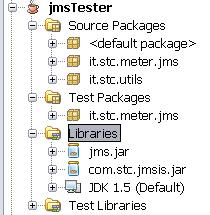
Add Mockrunner libs to your project's test library by right-clicking the libraries node in your project and selecting "Properties"


In my case I'm connecting to CAPS JMS server, so I need both jms.jar and com.stc.jmsis.jar files. The latter is part of the CAPS eGate APIkit distribution and allows to connect to Sun SeeBeyond JMS server implementation from a generic Java client: you need to put here your specific JMS server client libraries. My intention is to run my custom Java application against the real JMS server (as said, in my case it is CAPS), but to run automatic JUnit tests against the mock implementation.


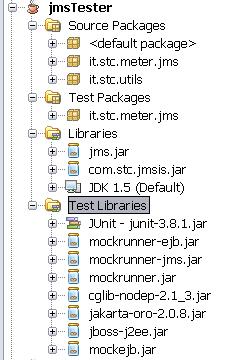
Now add Mockrunner's necessary libraries to the "Compile-time Test Libraries" tab:


The final result should looks like the picture below:


A simple test-case

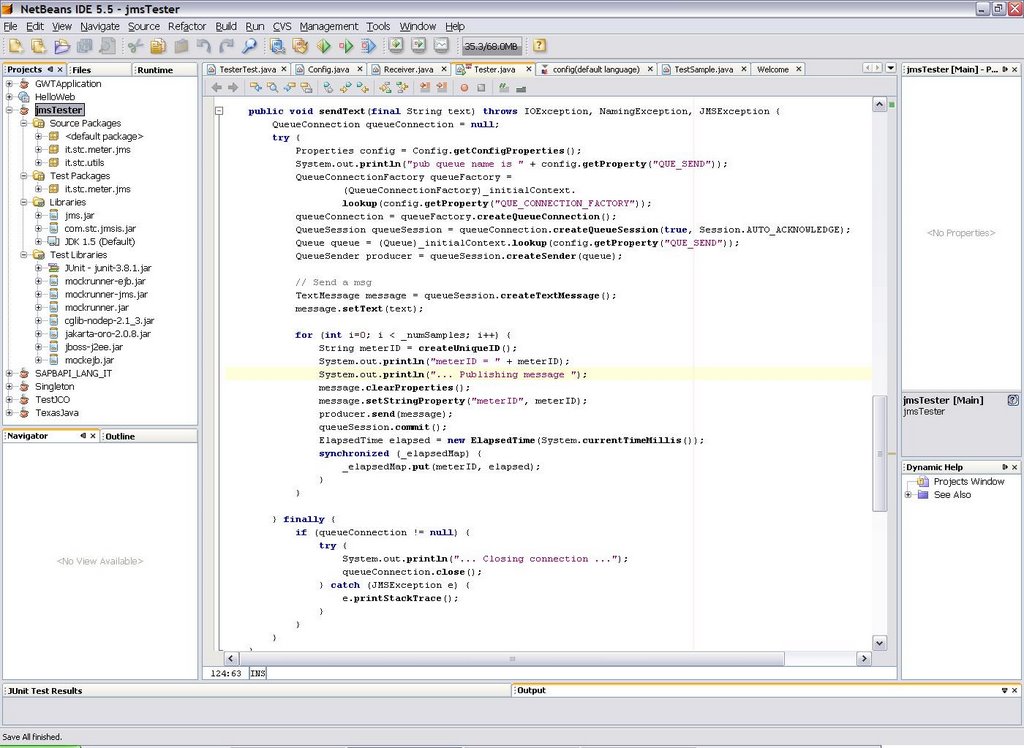
Here I show a simple test for the "sendText" method of my class which uses Mockrunner's stubs. Mockrunner internally uses MockEJB libraries to simulate a J2EE container:

/*
 * TesterTest.java
 * JUnit based test
 *
 * Created on 28 November 2006, 17:33
 */
package it.stc.meter.jms;

import com.mockrunner.ejb.EJBTestModule;
import com.mockrunner.jms.JMSTestCaseAdapter;
import com.mockrunner.mock.jms.MockQueue;
import it.stc.utils.Config;
import java.io.IOException;
import java.util.List;
import javax.jms.JMSException;
import javax.jms.TextMessage;
import javax.naming.InitialContext;
import javax.naming.NamingException;

public class TesterTest extends JMSTestCaseAdapter {

    private EJBTestModule _ejbModule;
    private MockQueue _queIN;
    private MockQueue _queOUT;
    private InitialContext _initialContext;

    public TesterTest(String testName) {
        super(testName);
    }

    protected void setUp() throws Exception {
        super.setUp();
        _ejbModule = createEJBTestModule();
        _ejbModule.bindToContext("connectionfactories/queueconnectionfactory",
                getJMSMockObjectFactory().getMockQueueConnectionFactory());
        _queIN = getDestinationManager().createQueue("quIN");
        _queOUT = getDestinationManager().createQueue("quOUT");
        _ejbModule.bindToContext("queues/quIN", _queIN);
        _ejbModule.bindToContext("queues/quOUT", _queOUT);
        _initialContext = new InitialContext();
    }

    protected void tearDown() throws Exception {
    }

    public void testSendText() throws IOException, NamingException,
            JMSException {
        final String text = "prova";
        final int numSamples = 3;
        Tester m = new Tester(_initialContext, numSamples);
        m.sendText(text);
        verifyNumberOfReceivedQueueMessages("quIN", 3);
        List receivedMessages = getReceivedMessageListFromQueue("quIN");
        for (Object message : receivedMessages) {
            assertEquals(text, ((TextMessage) message).getText());
        }
        verifyNumberQueueSessions(1);
        verifyAllQueueSessionsClosed();
        verifyQueueConnectionClosed();
        verifyAllQueueSessionsCommitted();

    }
}

Conclusions

This article briefly shows how to setup Netbeans to make use of Mockrunner to test JMS clients without the need to connect to the real JMS server. In a future article I'll go deeper on the CAPS JMS server facts and I'll show how to apply this scenario to create automatic JUnit test cases for EAI flows built in SeeBeyond ICAN 5.0 or Sun CAPS 5.1. Automatic testing of EAI solutions is usually sligthly more complex than testing normal applications.

Wednesday, November 8, 2006

JMS topics and message selectors in CAPS

A topic is a JMS message destination that conforms to the publish-and-subscribe messaging paradigm. In this tiny example I show how to publish a message to a topic in Java CAPS, using message selectors to filter message destinations.

Publisher JCD
This JCD (Java Collaboration Definition in CAPS idiom) is triggered by a File eWay and publishes a JMS text message to a topic

public class jcdPublisher
{

public com.stc.codegen.logger.Logger logger;

public com.stc.codegen.alerter.Alerter alerter;

public com.stc.codegen.util.CollaborationContext collabContext;

public com.stc.codegen.util.TypeConverter typeConverter;

public void receive( com.stc.connector.appconn.file.FileTextMessage input, com.stc.connectors.jms.JMS JMS_1 )
throws Throwable
{
String content = input.getText();
com.stc.connectors.jms.Message msg = JMS_1.createTextMessage();
msg.storeUserProperty( "dest", content );
msg.setTextMessage( content );
JMS_1.send( msg );
}

}

the line
msg.storeUserProperty( "dest", content );
stores the user property that will be used later by message selectors to filter messages.

Consumer JCD
This JCD simply receives a text message from the JMS source (a topic, but it is not specified here but in the Connectivity Map) and writes it to a local file using the File eWay

public class jcdConsumer {

public com.stc.codegen.logger.Logger logger;

public com.stc.codegen.alerter.Alerter alerter;

public com.stc.codegen.util.CollaborationContext collabContext;

public com.stc.codegen.util.TypeConverter typeConverter;

public void receive(com.stc.connectors.jms.Message input,
com.stc.connector.appconn.file.FileApplication FileClient_1)
throws Throwable {
FileClient_1.setText(input.getTextMessage());
FileClient_1.write();
}

}

Connectivity Map
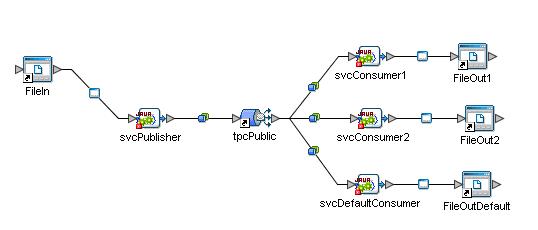
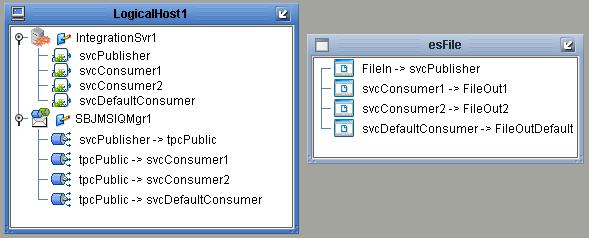
In the connectivity map there are four services:
* svcPublisher contains an instance of jcdPublisher
* svcConsumer1, svcConsumer2 and svcDefaultConsumer all contain a copy of jcdConsumer


svcPublisher receives a file content from FileIn (File eWay instance) and publish it into tpcPublic topic. the three consumers receives messages after they are selected by message selectors.
In this toy example the input text file which triggers the process contains just a list of numbers:

4
1
2
2
1
2
3
1

message selectors are built so that they filter messages using the "dest" user property

Message Selectors
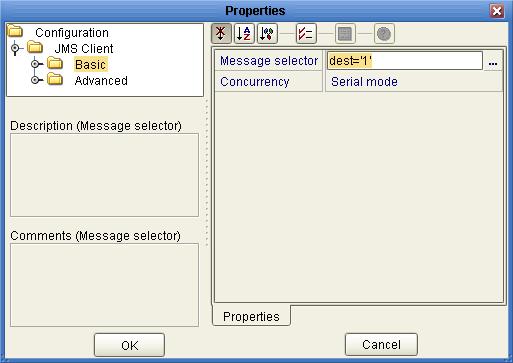
svcConsumer1 consumes only messages with an user property dest='1'


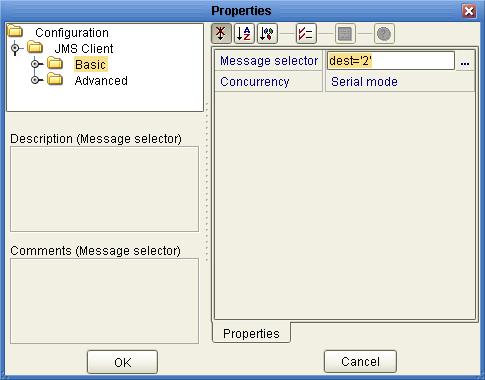
svcConsumer2 consumes only messages with an user property dest='2'


svcDefaultConsumer consumes only messages with the 'dest' user property that is neither '1' nor '2', so it can be expressed as
NOT (dest='1' OR dest='2')


Deployment Profile
The DP maps project components present in a Connectivity Map to a given Environment


Results
Results are written in three distinct files: output1.txt (it will contains only '1'), output2.txt ('2') and outputDef.txt (contains all the other numbers that are not '1' or '2', present in input.txt)

Conclusions
What happens if one of the Connectivity Maps link does not contain any message selector? The obvious response is that the connected consumer would receive *all* the messages, regardless of the user property stored into the message header.