The Java CAPS Release 6.2 Documentation Center is already available at:
http://docs.sun.com/app/docs/doc/821-0538
Showing posts with label jcaps. Show all posts
Showing posts with label jcaps. Show all posts
Sunday, October 11, 2009


Wednesday, October 7, 2009
Java CAPS 6.2 to be released
There are rumours that the latest Java CAPS 6.2 will be released within end of this month. So far Sun has already published the release notes.
In summary, from the release notes:
In summary, from the release notes:
This release of Java CAPS uses the following versions of NetBeans and GlassFish:
- NetBeans IDE 6.5.1
- GlassFish Enterprise Server 2.1 patch 2
This release of Java CAPS provides new support for the following operating systems:
Design-Time
- Windows Server 2008
- Red Hat Enterprise Linux AS 5.3 (64 bit)
Runtime
- Windows Server 2008 (OS: 32 bit; JVM: 32 bit)
- OpenSolaris 2008.11 (OS: 32 bit; JVM: 32 bit)
- Red Hat Enterprise Linux Server 5.3 (OS: 32 bit; JVM: 32 bit)
- Red Hat Enterprise Linux Server 5.3 (OS: 64 bit; JVM: 32 bit)
- IBM AIX 5L 5.3 (OS: 64 bit; JVM: 32 bit)
This release of Java CAPS adds support for the following browsers and external systems:
- Firefox 3.5.2 for accessing all Java CAPS browser components
- OpenSSO Web Services Security (WSS) Agent for the HTTP Adapter
- SWIFT 2009 messages and SWIFT 2009 certification
- SAP JCo 3 for the SAP BAPI Adapte
- It is a bit disappointing that the IDE is not Netbeans 6.7. I have experienced JAX-WS Web Services deployment issues with Netbeans 6.5 and the suggested solution has been to upgrade to Nb 6.7 (!?!) so I really hope Sun has fixed some bugs in Nb 6.5 before packaging it with JCAPS. It would be annoying to start patching the stuff the day after downloading it.
- Finally Java CAPS has an understandable version numbering convention: this release will be called 6.2 and not "6 update 2", which meant nothing unless you want to remember customers a sound close to the Windows service packs...
Friday, March 6, 2009
The OpenESB and Java CAPS consulting ecosystem
Sun's new open-source strategy offers interesting consulting opportunities. In the last months I have worked closely with former SeeBeyond and Sun colleagues to build a network of partners able to independently support the free OpenESB and commercial Java CAPS platforms at all levels. A set of very skilled professional left Sun recently and joined the freelance market or started new companies. Most of these expert people were actually also in charge of developing core aspects of the Glassfish ESB, Java CAPS and MDM suites, so it is possible to even offer product's enhancements and customizations. Sun is supporting this effort, so we are more and more closely coordinating activities with Sun Services in US and EMEA.
It is a huge paradigm shift from SeeBeyond. When I was in SeeBeyond everything was closed and even secret, while Sun is now growing as an open company embracing open-source as a way to tackle the market from a very different angle than its competitors. At the beginning many Sun employees were doubtful about new Sun strategy, it is so distant from the company's culture. Sun was, and partially still is, an hardware and infrastructural software vendor, a company built by engineers for engineers, with a technology language and culture. Integration and SOA are much more related to pure business aspects, customer's expectation are very different because they take for granted that the technological problems are solved, what they want is business integration, which requires a lot of consulting expertise. This kind of combination of technical and business expertise is exactly in the DNA of former SeeBeyond consultants.
The network of partners is growing and able to fill the business gap. SOA is not much related to technologies, it is about designing and fitting an Enterprise Architecture, it requires first to understand customer's business needs. The OpenESB ecosystem is made of a set of commercially supported open-source tools which provides the possible best value for money. Now there exists also a worldwide consulting services offering able to put this software effectively in production.
OpenESB is an open community, where Sun, its partners and customer can collaborate to create the best set of features, pro-actively suggesting functionalities and corrections. In which ways OpenESB offering is different from both big vendors and other similar open-source products?

So, what are the real services a customer can expect from the network of professional OpenESB partners?
For more information about the "unit-42" partnership network, please drop an email to me or my business partner.
It is a huge paradigm shift from SeeBeyond. When I was in SeeBeyond everything was closed and even secret, while Sun is now growing as an open company embracing open-source as a way to tackle the market from a very different angle than its competitors. At the beginning many Sun employees were doubtful about new Sun strategy, it is so distant from the company's culture. Sun was, and partially still is, an hardware and infrastructural software vendor, a company built by engineers for engineers, with a technology language and culture. Integration and SOA are much more related to pure business aspects, customer's expectation are very different because they take for granted that the technological problems are solved, what they want is business integration, which requires a lot of consulting expertise. This kind of combination of technical and business expertise is exactly in the DNA of former SeeBeyond consultants.
The network of partners is growing and able to fill the business gap. SOA is not much related to technologies, it is about designing and fitting an Enterprise Architecture, it requires first to understand customer's business needs. The OpenESB ecosystem is made of a set of commercially supported open-source tools which provides the possible best value for money. Now there exists also a worldwide consulting services offering able to put this software effectively in production.
OpenESB is an open community, where Sun, its partners and customer can collaborate to create the best set of features, pro-actively suggesting functionalities and corrections. In which ways OpenESB offering is different from both big vendors and other similar open-source products?
- It is fully open-source and supporting open standards, so you can really avoid any vendor lock-in
- Full commercial support and indemnification is optionally provided by Sun at much cheaper prices than any other big vendor
- You can download the suite, develop your solution and then decide if and when buy commercial support
- Comparing to other open-source ESB, support is provided by a much bigger company, the one who invented Java
- The set of development and runtime environments (Netbeans, Glassfish, OpenMQ, JBI) is very mature and allows for better developers productivity than other open-source ESB

So, what are the real services a customer can expect from the network of professional OpenESB partners?
- High level consulting expertise, most consultants are former SeeBeyond and Sun professional services. No kids, senior people only with up to 25 years experience
- Possibility to leverage both Sun's technical support and the open-source community, to get independent advices
- Ability to modify or create custom JBI adapters, as many companies in the network are OpenESB code committers and some were even Sun product managers (can you really ask your Big Vendor to create a custom adapter for you?)
- For previous SeeBeyond customers there is also a lot of added value, as the network can offer tailored migration plans from DataGate, eGate 4.x, ICAN 5.0, JCAPS 5.1 to OpenESB and Java CAPS 6
- Ability to support big enterprises worldwide. I'm in touch with partners from Israel to Scandinavia, and in US also. We are looking for partners in Australia and New Zealand shortly.
- Any vertical market: retail, healthcare, telecommunications, finance, energy, ...
- Any EAI experience: SAP, Siebel, Oracle, CICS, SWIFT, Microsoft, ...
- Identity management, Role management & provisioning, Security, Master Data Indexes, federated SSO, SOA Governance, Business Process Management, Rule Engines.
- On going partnership discussions with Savvion, Fair Isaac, Autonomy and other specialized vendors.
For more information about the "unit-42" partnership network, please drop an email to me or my business partner.
Friday, October 10, 2008
Java CAPS 6 Tutorials and Sample Projects
Recent tutorials and screencasts about JavaCAPS 6 can be found here. Version 6 of JavaCAPS introduces many new and additional features, so it usually takes some time to figure out the whole thing. The Grok JavaCAPS Wiki is another complete source of updated information.
Saturday, September 13, 2008
Sun Releases Milestone 1 for GlassFish ESB
Today Sun made the public release of Milestone 1 for GlassFish ESB.
"GlassFish ESB is a binary distribution of OpenESB. It consists of subset of the components in OpenESB. Sun will provide commercial support for GlassFish ESB."
GlassFish ESB delivers a lightweight and agile ESB platform that packages the innovation happening with Project OpenESB into a commercially supported, enterprise-class platform. In essence, GlassFish ESB is a binary distribution that combines technology from Project OpenESB, the GlassFish application server and the NetBeans IDE communities into a supported, commercial distribution.
"GlassFish ESB is a binary distribution of OpenESB. It consists of subset of the components in OpenESB. Sun will provide commercial support for GlassFish ESB."
GlassFish ESB delivers a lightweight and agile ESB platform that packages the innovation happening with Project OpenESB into a commercially supported, enterprise-class platform. In essence, GlassFish ESB is a binary distribution that combines technology from Project OpenESB, the GlassFish application server and the NetBeans IDE communities into a supported, commercial distribution.
- GlassFish ESB is a binary distribution from the open source bits in OpenESB.
- Sun will support GlassFish ESB just like any other product: it will not just support the latest version, but also older versions. Once released, fixes to GlassFish ESB will be made on a branch behind the firewall and will be merged periodically to the head of the OpenESB code repository. This is an important point for customers who don’t like to continuously upgrade in production.
- Sun will continue to develop in open source on the OpenESB head.
- GlassFish ESB will be released on Dec 5th; there will be two more milestone releases in between.
- The GlassFish ESB site will soon live on sun.com. There are a few pages for GlassFish ESB on OpenESB just temporarily. We’re trying to separate the commercial aspects (i.e. GlassFish ESB) from OpenESB as much as possible: OpenESB is and should remain an open source community.
- The GlassFish ESB downloads will remain on OpenESB because the bits are being developed in Open Source.
- This does not change anything for the ESB Suite, MDM, and JavaCAPS: we will continue to develop them. There is and will remain a value differentiation between GlassFish ESB and the other products.
- There will be separate component releases next to GlassFish ESB. E.g. IEP will release soon as a separate component.
- A flexible platform supporting multiple architectural styles (SOA, EJB, MoM, BPM)
- Modular architecture enabling a tailored solution platform for specific project and enterprise needs.
- Leading SOA and WS-* (WS-IT/Metro) support with industry leading interoperability with other platforms
- Integration tooling, based on the award-winning NetBeans IDE with integrated service development, deployment and testing
- Support for JBI, Java EE 5 and a wide range of other key industry standards
- Based on fully open communities Project OpenESB, GlassFish and NetBeans
- Backed by Sun's software support services
- Backed by a large and growing community with an exciting roadmap and future vision
Friday, August 1, 2008
Creating a new CAPS 6-ready GlassFish domain
Louis Polycarpou has written a blog entry to explain an important point about JavaCAPS 6 and Glassfish configuration of additional domains.
CAPS 5.1.x users will notice that there is no longer a domain manager tool to simplify domain management tasks such as domain creation. This was effectively tied to the Sun SeeBeyond Integration Server, which no longer exists, but the domain manager may return in future releases.
Read the full article.
On my side I hope Sun is going to make this procedure simpler, as it was with version 5. The suite is already big and complex enough, we do not really need to remove tools which make our life easier.
CAPS 5.1.x users will notice that there is no longer a domain manager tool to simplify domain management tasks such as domain creation. This was effectively tied to the Sun SeeBeyond Integration Server, which no longer exists, but the domain manager may return in future releases.
Read the full article.
On my side I hope Sun is going to make this procedure simpler, as it was with version 5. The suite is already big and complex enough, we do not really need to remove tools which make our life easier.
Wednesday, May 21, 2008
First and Only Java CAPS Book is Available
Sun's Michael Czapski has recently published a book about Java CAPS. As far as I know that is the very first book about the subject, it covers the product deeply by showing how to implement common integration design patterns. I hope I can buy a copy soon, it should be available through Amazon.
stcqueueviewer: Dinamically Monitoring JCAPS JMS Server Queues
Disclaimer: the below procedure is undocumented and not officially supported, so you are using this at your own risk only. Please contact Sun's JavaCAPS support or Professional Services for more
I recently had to dynamically monitor some JMS queues within JavaCAPS , especially my need was to count the number of messages in a given queue before posting additional messages, to avoid unnecessary queue flooding. JavaCAPS is fully JMX compliant, the embedded Sun Application Server is well-documented on that side but the SeeBeyond IQ Manager (default JavaCAPS' JMS server implementation) is lacking some info, so I decided to go for some hacking.
My colleague Paul pointed me in the right direction, he suggested to have a look at the com.stc.jms.stcqueueviewer.jar contained into
To compile and run this with Netbeans 6 you need to import some additional JAR files from the JavaCAPS Logicalhost logicalhost\is\stcms\lib folder:

By the way, if you have not tried the new Netbeans 6 yet, then shame on you!
If you want instead to do the same within a JavaCAPS JCD you need to execute the following steps:
1. create a new JCD
2. Import the com.stc.jms.stcqueueviewer.jar JAR file into repository
3. Import the above JAR into the JCD

4. Do something useful with the dynamic information you get

The above JCD example is pretty silly, just to show you something
That's it. There other useful methods into Server class, you can explore and discover other interesting things. Hopefully somewhere more queueviewer's documentation is available, so it won't be necessary to decompile the Java classes...
I recently had to dynamically monitor some JMS queues within JavaCAPS , especially my need was to count the number of messages in a given queue before posting additional messages, to avoid unnecessary queue flooding. JavaCAPS is fully JMX compliant, the embedded Sun Application Server is well-documented on that side but the SeeBeyond IQ Manager (default JavaCAPS' JMS server implementation) is lacking some info, so I decided to go for some hacking.
My colleague Paul pointed me in the right direction, he suggested to have a look at the com.stc.jms.stcqueueviewer.jar contained into
logicalhost\is\stcms\libThis library is almost undocumented, so I had to reverse-engineer its classes by using the nice DJ tool. The most interesting file is called Server.java, the Server class contains what is necessary to fully monitor the SeeBeyond IQ manager from a Java program. Below an example:
package queuemonitor;

import com.stc.jms.queueviewer.*;

public class Main {

    public static void main(String[] args) throws Exception {

        Server sv = new Server();

        sv.connect("localhost", 18007, "Administrator", "STC");

        QueueStatistics queueStatistics = new QueueStatistics();

        sv.getQueueStatistics(queueStatistics, "qStoreDocument");
        System.out.println("MinSeqNo=" + queueStatistics.MinSeqNo);
        System.out.println("MaxSeqNo=" + queueStatistics.MaxSeqNo);
        System.out.println("MessageCount=" + queueStatistics.MessageCount);
        sv.disconnect();
    }
}
To compile and run this with Netbeans 6 you need to import some additional JAR files from the JavaCAPS Logicalhost logicalhost\is\stcms\lib folder:
- com.stc.jms.stcjms.jar
- com.stc.jms.stcqueueviewer.jar
- jms.jar

By the way, if you have not tried the new Netbeans 6 yet, then shame on you!
If you want instead to do the same within a JavaCAPS JCD you need to execute the following steps:
1. create a new JCD
2. Import the com.stc.jms.stcqueueviewer.jar JAR file into repository
3. Import the above JAR into the JCD

4. Do something useful with the dynamic information you get

The above JCD example is pretty silly, just to show you something
That's it. There other useful methods into Server class, you can explore and discover other interesting things. Hopefully somewhere more queueviewer's documentation is available, so it won't be necessary to decompile the Java classes...
Friday, March 21, 2008
Eric Lerognon's JCAPS 6 to SAP ECC 5.0 notes
This note, sent by my former colleague Eric Lerognon of Sun France, demonstrates how to connect from JCAPS 6 to SAP ECC 5.0.
Merci beaucoup Eric!
Merci beaucoup Eric!
Monday, March 17, 2008
Will Java CAPS 6 be based on Netbeans 6.1 ?
Rumors are that the next generation of Java CAPS will be based on a new Netbeans version. No more fights with the eDesigner, eventually. ICAN 5.0 and JCAPS 5.1 IDEs were based on a very old Netbeans (v 3.5) heavily customized by SeeBeyond, called the eDesigner. Additionally jcaps 6 JEE runtime is going to be Glassfish, the Sun open-source application server (at present jcaps runs over old SJAS 8.0).
For seasoned jcaps developers, used to workaround some eDesigner's weird behaviors, it will be a huge improvement, as Netbeans 6 represents probably the most advanced Java IDE in the market (and yes, I mean even better than Eclipse). Glassfish then is one of the best JEE 5 and EJB 3 implementation available, this means Java CAPS 6 is evolving to a complete and powerful Java enterprise application development environment, not limited to EAI only. That shows a strong Sun's commitment in favor of jcaps, good for both partners and customers.
For seasoned jcaps developers, used to workaround some eDesigner's weird behaviors, it will be a huge improvement, as Netbeans 6 represents probably the most advanced Java IDE in the market (and yes, I mean even better than Eclipse). Glassfish then is one of the best JEE 5 and EJB 3 implementation available, this means Java CAPS 6 is evolving to a complete and powerful Java enterprise application development environment, not limited to EAI only. That shows a strong Sun's commitment in favor of jcaps, good for both partners and customers.
Saturday, March 1, 2008
A Java CAPS Custom Security Provider Enablement
Recently I had to enable a Java custom security provider implemented by a customer. The implementation is based on a set of JAR files included into Java Collaborations, providing some special signing and hashing security features.
To have that libraries working I just had to add few lines to the server.policy file, which resides into:
Below the additional permissions fragment:
To have that libraries working I just had to add few lines to the server.policy file, which resides into:
logicalhost\is\domains\domain1\configbeing domain1 my target domain. The JAR files were put into
logicalhost\is\domains\domain1\lib\ext
Below the additional permissions fragment:
// Basic set of required permissions granted to all remaining code
grant {
    ...
    // Java CAPS needs these permissions so that the Bouncy Castle provider can be used
    permission java.security.SecurityPermission "insertProvider.BC";
    permission java.security.SecurityPermission "removeProvider.BC";
    permission java.security.SecurityPermission "putProviderProperty.BC";

    //----------------------------------------------------------------------------
    //  "InnoSec" custom security provider
    //----------------------------------------------------------------------------
    permission java.security.SecurityPermission "insertProvider.InnoSec";
    permission java.security.SecurityPermission "removeProvider.InnoSec";
    permission java.security.SecurityPermission "putProviderProperty.InnoSec";
    //----------------------------------------------------------------------------
    ...
Sunday, February 24, 2008
The Fluxology Office is Now a Sun Belgium's Services Partner
The Fluxology Office s.r.l., being committed to grow a stable and fruitful relationship with Sun Microsystems in all EMEA regions, has established a partnership with Sun Belgium. An important part of the relationship will be to develop expertise and provide feedback about the incoming new Java CAPS release, which will represent a quantum leap in terms of EAI, SOA and complex events processing tools.
Even if features of new product are still undisclosed (not to say secret), hopefully it will be the very first fully Sun-engineered release after the SeeBeyond acquisition in 2005, and it will be fully compliant with the latest JEE 5 specifications.
Here at Fluxology we think Sun is going to offer the most complete and technologically advanced application and integration JEE development platform.
Even if features of new product are still undisclosed (not to say secret), hopefully it will be the very first fully Sun-engineered release after the SeeBeyond acquisition in 2005, and it will be fully compliant with the latest JEE 5 specifications.
Here at Fluxology we think Sun is going to offer the most complete and technologically advanced application and integration JEE development platform.
Friday, November 16, 2007
Java CAPS review from The SOA Lab
Note: the previous review was written in 2007, so it was no more up to date and I decided to remove the link because it could be misleading. The Java CAPS product line has evolved a lot since version 5, the new version 6 introduces a whole set of new possibilities as it merges previous JCAPS 5.1 Repository components with the new, open-source JBI architecture and components based on the OpenESB, Netbeans and Glassfish Communities.
A recent review of the latest JBI-based products (Glassfish ESB) can be read here.
If you want to discuss more about the new Sun's SOA / EAI product line you can send me an email.
A recent review of the latest JBI-based products (Glassfish ESB) can be read here.
If you want to discuss more about the new Sun's SOA / EAI product line you can send me an email.
Monday, November 5, 2007
Saturday, August 25, 2007
java.lang.OutOfMemoryError: unable to create new native thread
Symptoms
Some days ago a flow running into JCAPS 5.1 produced this exception:
java.lang.OutOfMemoryError: unable to create new native thread
The first attempt, especially if you are used to ICAN 5.0, would be to add memory to the JVM's heap with the -Xmx flag. But forget for a while about the misleading "OutOfMemoryError" and focus to the rest of the message: it is clearly telling that the JVM was asking the O.S. to create a native thread, but that was not possible. It does not mean you don't have enough heap. In fact, the mentioned flow was already running into a Logicalhost with 1024 Mb of memory and there was no sign that it was not enough.
Diagnosis
Depending on your operating system and JVM version, you can have a pretty different per-thread stack size which affects both the maximum number of native threads you can start and the overall consumed memory. See the Java HotSpot VM Options:
Thread Stack Size (in Kbytes). (0 means use default stack size)
Sparc: 512;
Solaris x86: 320 (was 256 prior in 5.0 and earlier);
Sparc 64 bit: 1024;
Linux amd64: 1024 (was 0 in 5.0 and earlier);
all others 0.
When your application is trying to start too many threads you might need to decrease the default stack assigned to each thread using the -Xss parameter, so that each single thread has less stack but you can create more of them. For some operating systems this is not enough, you should decrease the O.S stack size using the "ulimit -s" command.
Currently, some stack sizes are:

           ThreadSS  VMThreadSS  CompilerThreadSS   default_stack_size

SPARC 32       512K      0  C2:2048K   C1:0      not used
SPARC 64      1024K      0  C2:2048K   C1:0      not used
Solaris i486   256K      0  C2:2048K   C1:0      not used

Linux i486       0       0  0                      512K
Linux ia64       0       0  0                     1024K

Win32 i486       0       0  0  ASSERTs:1024K         0
Win32 ia64       0       0  0  ASSERTs:1024K         0

Notes:
  1) 0 for VMThreadSS and CompilerThreadSS implies
     use of ThreadSS value

  2) 0 for ThreadSS implies use of default_stack_size
Generally speaking you should usually start testing your flows with a little JVM heap, the default JCAPS 512 Mb is normally enough. Then you should increase step by step this value only and only if your processes are allocating big data structures requiring more heap. A good step size could be 256 Mb. It is never a brilliant idea to set your domain's heap to, say, 1.5 Gb by default only because this seems to let you sleep well. Additionally to the mentioned thread problem a bigger heap will lead to more complex and longer garbage collection cycles, penalizing performances in the medium term. It is then a good idea to set the same value for -Xms and -Xmx to help the GC.
Tuesday, August 14, 2007
Java CAPS: Processing Large XML Payloads Using a SAX Parser
Introduction
In Java CAPS the standard way to deal with XML files is to parse them through Object Type Definitions (OTD). An OTD represents a XML file as a Java object, it provides marshal and unmarshal methods, plus setters and getters for each XML document's element.
The OTD is a smart way to create a DOM tree in memory, starting from the XML source document. However, if the XML file is large loading it entirely in memory through a DOM representation is generally not a great idea. In this case is common to use a SAX parser, which allows to process the XML file as a stream instead of loading the entire object in memory. SAX parsing is of course easily implementable in Java CAPS, as this article will briefly show.
Implementation
The implementation is straightforward, it is just plain Java code. In this example an the eGate flow is triggered by an event in the form of a JMS message containing the filename. As the XML file we'd like to process is assumably large (otherwise why bother us with SAX...) it probably resides in some filesystem, so in this case a BatchLocalFile (part of the optional Batch eWay) can be used to read it. You are not doing such a stupid thing like sending multiple megabytes payloads through your JMS server, aren't you? As a general rule of thumb, it is a wise idea to keep your JMS payloads below 1 Mb, to avoid overloading your JMS server. As already explained in other posts, I think moving bigger payloads through JMS is a clear indicator of some flaws in your process' design and, sooner or later, it will drive to troubles.
Connectivity Map
Below the simple CM for this example:

The queIn channel receives triggering events for the svcSaxParser service, which makes use of a BatchLocalFile external application to read the file from disk. The JCD, as described below, is really trivial and logs some elements using the standard logger.
Java Collaboration Definition
the SAX parsing service is implemented through a JCD called jcdSaxParser. It receives the input JMS message containing the filename, opens the InputStream from disk and assign it to the SAX parser. A SAX's DefaultHandler inner class, called (with some lack of fantasy...) MyHandler, is defined and used to intercept SAX events:
package SamplesprjSAXJCD;

import java.io.InputStream;
import org.xml.sax.helpers.DefaultHandler;
import javax.xml.parsers.SAXParserFactory;
import org.xml.sax.Attributes;
import org.xml.sax.SAXException;

public class jcdSaxParser
{
  public com.stc.codegen.logger.Logger logger;
  public com.stc.codegen.alerter.Alerter alerter;
  public com.stc.codegen.util.CollaborationContext collabContext;
  public com.stc.codegen.util.TypeConverter typeConverter;

  public void receive( com.stc.connectors.jms.Message input, com.stc.eways.batchext.BatchLocal BatchLocalFile_1 )
      throws Throwable
  {
      try {
          BatchLocalFile_1.getConfiguration().setTargetDirectoryName( "D:\\Projects" );
          BatchLocalFile_1.getConfiguration().setTargetFileName( input.getTextMessage() );
          InputStream istream = BatchLocalFile_1.getClient().getInputStreamAdapter().requestInputStream();
          // Create a handler to handle SAX events
          DefaultHandler handler = new MyHandler( logger );
          // Parse the stream
          parseXmlStream( istream, handler, false );
          BatchLocalFile_1.getClient().getInputStreamAdapter().releaseInputStream( true );
      } catch ( Exception ex ) {
          logger.error( "@@@ ", ex );
      }
  }

  // Parses an XML stream using a SAX parser.
  public static void parseXmlStream( InputStream istream, DefaultHandler handler, boolean validating )
      throws Exception
  {
      SAXParserFactory factory = SAXParserFactory.newInstance();
      factory.setValidating( validating );
      factory.newSAXParser().parse( istream, handler );
  }

  // DefaultHandler contain no-op implementations for all SAX events.
  // This class should override methods to capture the events of interest.
  static class MyHandler extends DefaultHandler
  {
      private final com.stc.codegen.logger.Logger _logger;
      private final StringBuffer _buff = new StringBuffer( 1024 );

      public MyHandler( com.stc.codegen.logger.Logger logger )
      {
          _logger = logger;
      }

      public void startElement( String uri, String localName, String qName, Attributes attributes )
              throws SAXException
      {
          _buff.append( "startElement: uri=" ).append( uri ).append( ", localName=" ).append( localName ).append( ", qName=" ).append( qName ).append( "\n" );
      }

      public void characters( char[] cbuf, int start, int len )
              throws SAXException
      {
          _buff.append( "Characters: " ).append( new String( cbuf, start, len ) );
      }

      public void endElement( String uri, String localName, String qName )
              throws SAXException
      {
          if (_buff.length() > 0) {
              _logger.info( "@@@ " + _buff.toString() );
              _buff.delete( 0, _buff.length() );
          }
      }
  }
}
After creating a proper Deployment Profile you can run this flow by sending a JMS message containing the filename into queue queIn (you can use the eManager for that). Then you just need to add to the MyHandler class some more useful functionality.
The source stream was obtained from the InputStramAdapter of the BatchLocalFile:
InputStream istream = BatchLocalFile_1.getClient().getInputStreamAdapter().requestInputStream();Then the parsing is done by passing both the InputStream and the handler to the SAXPArser's parse method:
factory.newSAXParser().parse( istream, handler );
Conclusions
If you were struggling with 100 Mb big XML files and using OTD you've got plenty of OutOfMemory errors, you could try to implement a SAX parsing process as described in this article. Before implementing this technique ask yourself why the hell you are producing so big XML files and then try to fix your data model or your process, because to me you are using XML the wrong way.
A typical case where dealing with large XML files could be unavoidable is for HL7 v.3.0 XML messages: specs define huge XML Schemas for that standard, it could be even impossible to generate an OTD with the eDesigner.
Friday, December 1, 2006
JUnit testing JMS systems with Netbeans and Mockrunner
Scenario
You are developing a JMS-based application and you want to use those nice test-driven development habits that you have learned are so good in keeping your code clean and bug-free, but sending messages to a real JMS server is slowing down your edit - compile - test process. First because you always need to remember to start your JMS server each morning, second because running JUnit against the real system is a bit slow. Maybe you have an external server hosting your JMS server, so the first point does not apply to you, but in my case I use to run everything on my laptop, so it does matter.
A mock JMS implementation
Here is where Mockrunner comes in the scene.
"Mockrunner is a lightweight framework for unit testing applications in the J2EE environment. It supports servlets, filters, tag classes and Struts actions and forms. Furthermore it includes a JDBC, a JMS and a JCA test framework and can be used in conjunction with MockEJB to test EJB based applications.
Mockrunner extends JUnit and simulates the necessary behaviour without calling the real infrastructure. It does not need a running application server or a database. Furthermore it does not call the webcontainer or the Struts ActionServlet. It is very fast and enables the user to manipulate all involved classes and mock objects in all steps of the test. It can be used to write very sophisticated unit-tests for J2EE based applications without any overhead. Mockrunner does not support any type of in-container testing."
Actors
- Netbeans 5.5
- Java CAPS 5.1 default JMS server
- Mockrunner
Setup
Download the mockrunner-0.3.7.zip file and unzip it somewhere. Then you need to setup your Netbeans project to make use of Mockrunner's libraries.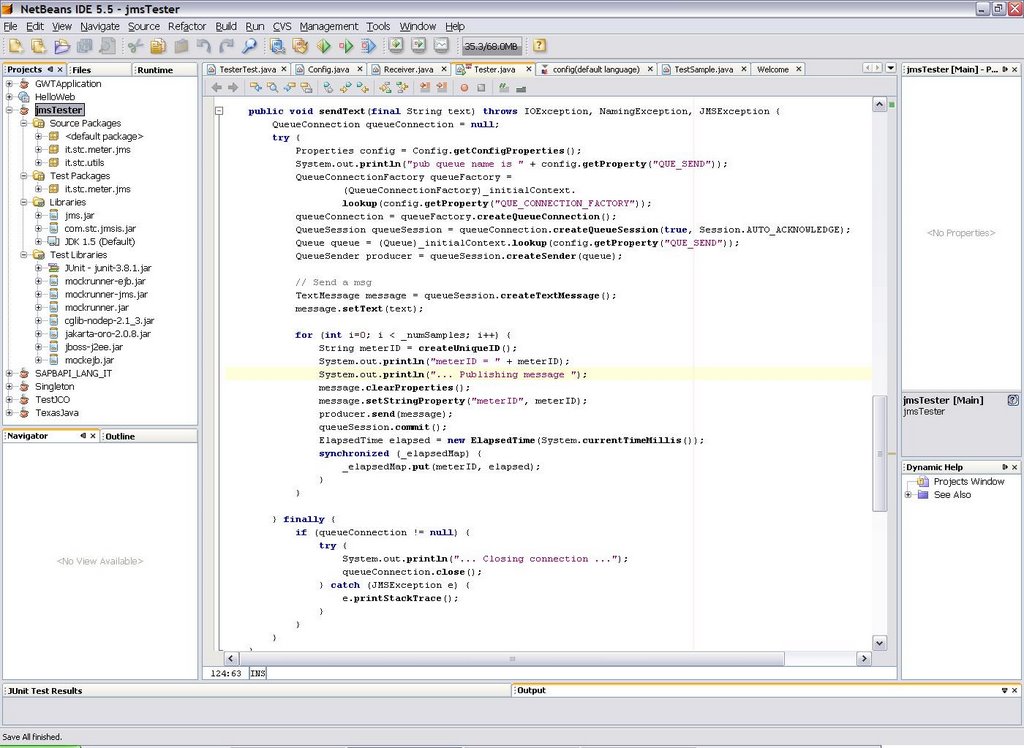
Add Mockrunner libs to your project's test library by right-clicking the libraries node in your project and selecting "Properties"
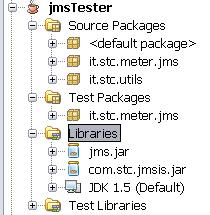
In my case I'm connecting to CAPS JMS server, so I need both jms.jar and com.stc.jmsis.jar files. The latter is part of the CAPS eGate APIkit distribution and allows to connect to Sun SeeBeyond JMS server implementation from a generic Java client: you need to put here your specific JMS server client libraries. My intention is to run my custom Java application against the real JMS server (as said, in my case it is CAPS), but to run automatic JUnit tests against the mock implementation.

Now add Mockrunner's necessary libraries to the "Compile-time Test Libraries" tab:

The final result should looks like the picture below:
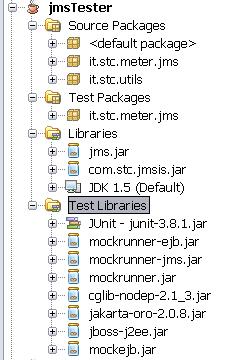
A simple test-case
Here I show a simple test for the "sendText" method of my class which uses Mockrunner's stubs. Mockrunner internally uses MockEJB libraries to simulate a J2EE container:/*
* TesterTest.java
* JUnit based test
*
* Created on 28 November 2006, 17:33
*/
package it.stc.meter.jms;
import com.mockrunner.ejb.EJBTestModule;
import com.mockrunner.jms.JMSTestCaseAdapter;
import com.mockrunner.mock.jms.MockQueue;
import it.stc.utils.Config;
import java.io.IOException;
import java.util.List;
import javax.jms.JMSException;
import javax.jms.TextMessage;
import javax.naming.InitialContext;
import javax.naming.NamingException;
public class TesterTest extends JMSTestCaseAdapter {
private EJBTestModule _ejbModule;
private MockQueue _queIN;
private MockQueue _queOUT;
private InitialContext _initialContext;
public TesterTest(String testName) {
super(testName);
}
protected void setUp() throws Exception {
super.setUp();
_ejbModule = createEJBTestModule();
_ejbModule.bindToContext("connectionfactories/queueconnectionfactory",
getJMSMockObjectFactory().getMockQueueConnectionFactory());
_queIN = getDestinationManager().createQueue("quIN");
_queOUT = getDestinationManager().createQueue("quOUT");
_ejbModule.bindToContext("queues/quIN", _queIN);
_ejbModule.bindToContext("queues/quOUT", _queOUT);
_initialContext = new InitialContext();
}
protected void tearDown() throws Exception {
}
public void testSendText() throws IOException, NamingException,
JMSException {
final String text = "prova";
final int numSamples = 3;
Tester m = new Tester(_initialContext, numSamples);
m.sendText(text);
verifyNumberOfReceivedQueueMessages("quIN", 3);
List receivedMessages = getReceivedMessageListFromQueue("quIN");
for (Object message : receivedMessages) {
assertEquals(text, ((TextMessage) message).getText());
}
verifyNumberQueueSessions(1);
verifyAllQueueSessionsClosed();
verifyQueueConnectionClosed();
verifyAllQueueSessionsCommitted();
}
}
Conclusions
This article briefly shows how to setup Netbeans to make use of Mockrunner to test JMS clients without the need to connect to the real JMS server. In a future article I'll go deeper on the CAPS JMS server facts and I'll show how to apply this scenario to create automatic JUnit test cases for EAI flows built in SeeBeyond ICAN 5.0 or Sun CAPS 5.1. Automatic testing of EAI solutions is usually sligthly more complex than testing normal applications.Wednesday, November 8, 2006
JMS topics and message selectors in CAPS
A topic is a JMS message destination that conforms to the publish-and-subscribe messaging paradigm. In this tiny example I show how to publish a message to a topic in Java CAPS, using message selectors to filter message destinations.
Publisher JCD
This JCD (Java Collaboration Definition in CAPS idiom) is triggered by a File eWay and publishes a JMS text message to a topic
the line
Consumer JCD
This JCD simply receives a text message from the JMS source (a topic, but it is not specified here but in the Connectivity Map) and writes it to a local file using the File eWay
Connectivity Map
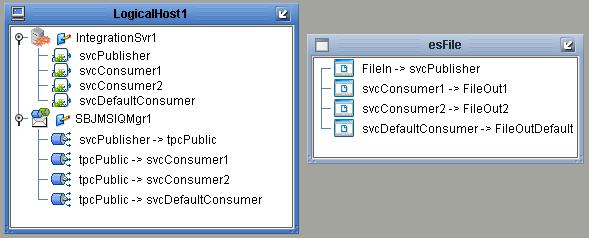
In the connectivity map there are four services:
* svcPublisher contains an instance of jcdPublisher
* svcConsumer1, svcConsumer2 and svcDefaultConsumer all contain a copy of jcdConsumer
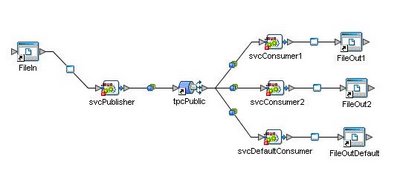
svcPublisher receives a file content from FileIn (File eWay instance) and publish it into tpcPublic topic. the three consumers receives messages after they are selected by message selectors.
In this toy example the input text file which triggers the process contains just a list of numbers:
message selectors are built so that they filter messages using the "dest" user property
Message Selectors
svcConsumer1 consumes only messages with an user property dest='1'

svcConsumer2 consumes only messages with an user property dest='2'

svcDefaultConsumer consumes only messages with the 'dest' user property that is neither '1' nor '2', so it can be expressed as

Deployment Profile
The DP maps project components present in a Connectivity Map to a given Environment
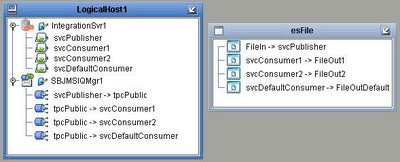
Results
Results are written in three distinct files: output1.txt (it will contains only '1'), output2.txt ('2') and outputDef.txt (contains all the other numbers that are not '1' or '2', present in input.txt)
Conclusions
What happens if one of the Connectivity Maps link does not contain any message selector? The obvious response is that the connected consumer would receive *all* the messages, regardless of the user property stored into the message header.
Publisher JCD
This JCD (Java Collaboration Definition in CAPS idiom) is triggered by a File eWay and publishes a JMS text message to a topic
public class jcdPublisher
{

    public com.stc.codegen.logger.Logger logger;

    public com.stc.codegen.alerter.Alerter alerter;

    public com.stc.codegen.util.CollaborationContext collabContext;

    public com.stc.codegen.util.TypeConverter typeConverter;

    public void receive( com.stc.connector.appconn.file.FileTextMessage input, com.stc.connectors.jms.JMS JMS_1 )
        throws Throwable
    {
        String content = input.getText();
        com.stc.connectors.jms.Message msg = JMS_1.createTextMessage();
        msg.storeUserProperty( "dest", content );
        msg.setTextMessage( content );
        JMS_1.send( msg );
    }

}
the line
msg.storeUserProperty( "dest", content );stores the user property that will be used later by message selectors to filter messages.
Consumer JCD
This JCD simply receives a text message from the JMS source (a topic, but it is not specified here but in the Connectivity Map) and writes it to a local file using the File eWay
public class jcdConsumer {

 public com.stc.codegen.logger.Logger logger;

 public com.stc.codegen.alerter.Alerter alerter;

 public com.stc.codegen.util.CollaborationContext collabContext;

 public com.stc.codegen.util.TypeConverter typeConverter;

 public void receive(com.stc.connectors.jms.Message input,
   com.stc.connector.appconn.file.FileApplication FileClient_1)
   throws Throwable {
  FileClient_1.setText(input.getTextMessage());
  FileClient_1.write();
 }

}
Connectivity Map
In the connectivity map there are four services:
* svcPublisher contains an instance of jcdPublisher
* svcConsumer1, svcConsumer2 and svcDefaultConsumer all contain a copy of jcdConsumer
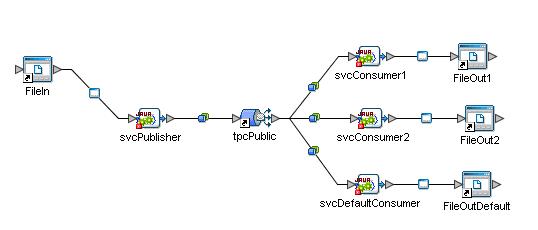
svcPublisher receives a file content from FileIn (File eWay instance) and publish it into tpcPublic topic. the three consumers receives messages after they are selected by message selectors.
In this toy example the input text file which triggers the process contains just a list of numbers:
4
1
2
2
1
2
3
1
message selectors are built so that they filter messages using the "dest" user property
Message Selectors
svcConsumer1 consumes only messages with an user property dest='1'
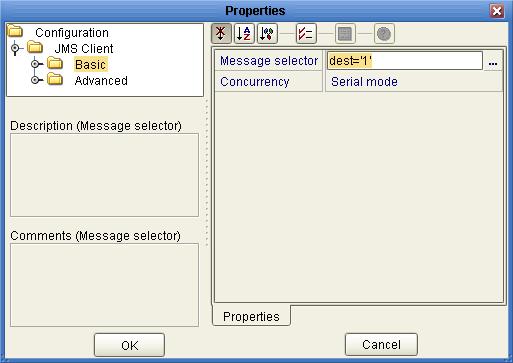
svcConsumer2 consumes only messages with an user property dest='2'
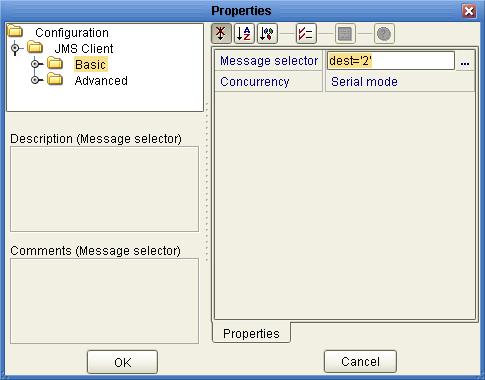
svcDefaultConsumer consumes only messages with the 'dest' user property that is neither '1' nor '2', so it can be expressed as
NOT (dest='1' OR dest='2')

Deployment Profile
The DP maps project components present in a Connectivity Map to a given Environment
Results
Results are written in three distinct files: output1.txt (it will contains only '1'), output2.txt ('2') and outputDef.txt (contains all the other numbers that are not '1' or '2', present in input.txt)
Conclusions
What happens if one of the Connectivity Maps link does not contain any message selector? The obvious response is that the connected consumer would receive *all* the messages, regardless of the user property stored into the message header.
Java CAPS - eInsight Business Processes Correlation HowTo
The Java Composite Application Platform Suite
The Java Composite Application Platform Suite (Java CAPS) allows companies to assemble large-scale applications built on existing systems and infrastructure. Java CAPS is an application-level network that unifies connectivity among people, application systems, and devices in different locations and across organizations. Business services facilitate the implementation of extended applications. Service oriented architectures (SOA) clarify design and enable reuse by sharing logic and data among different client systems and users.eInsight and Java CAPS
eInsight is a component of Java CAPS. eInsight delivers Business Process management features and functions to Java CAPS. Business Process management is a strategic orchestration of the movement of information and the flow of complex processes between participants (systems, users, and organizations) to accomplish larger business objectives. eInsight uses the standard BPEL language to describe processes1 Introduction
eInsight provides the means for matching existing Business Process instances to messages that are arriving into a Business Process. Correlation keys are individual data values contained within both the incoming message and the eInsight engine. When arriving messages contain data that matches the configured correlation keys, unique Business Process instances then continue processing on to the next step of a given Business Process.2 Message Correlations
A correlation key is a value that you can assign to a Business Process, like a Purchase Order number. The correlation key provides a way to associate and route information about specific Business Process instances. For asynchronous message exchange between components, you must implement correlation of the instance identification.An example of when you use asynchronous message exchanges is when you create a Receive Activity in the middle of a Business Process.
To have the correlation mechanisms working properly, right correlation keys are mandatory.
3 Example 1 - File trigger
In this scenario we have a calling process that sends a JMS message to another process and then waits for a reply, correlating instances through a unique ID.Invoked Process - bpReplier
The bpReplier process is called from the main one. It is very simple for this example: it just copies the Jms Correlation ID and adds some information in the text field.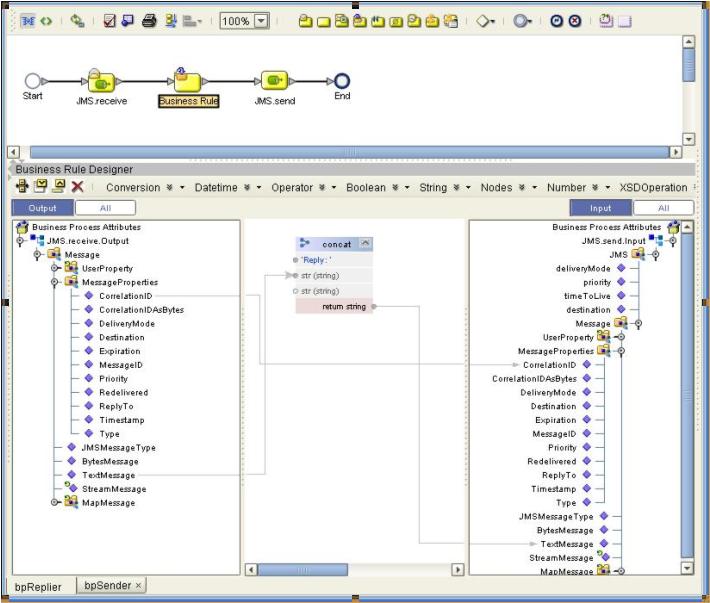
Main Process
The main process reads a correlation ID from a file, set it into the CorrelationID field of JMS->MessageProperties and then sends the message to the above mentioned bpReplier. An “Event Based Decision” waits for events: one it is a JMS.receive, second is a “Timer Event” in case nothing is received within a fixed amount of time.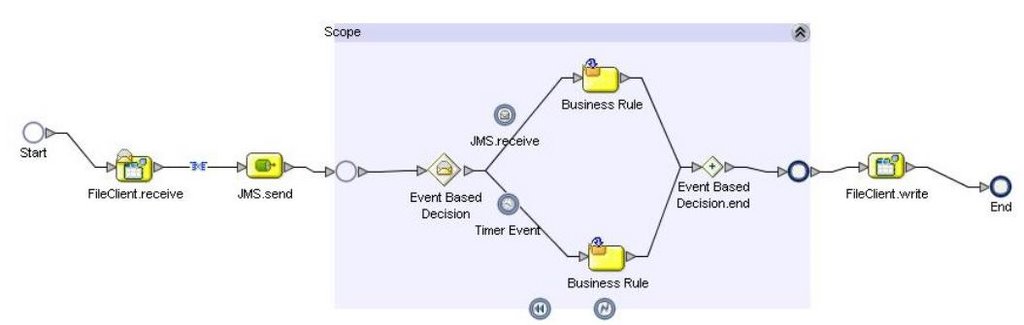
Correlation key
The correlation key is made of two aliases:* /Message/MessageProperties/CorrelationID
* /FileTextMessage/text

The correlation is used in two activities in the BP:
1 - FileClient.receive - with Initialize Set ='yes'
2 - JMS.receive (in the event based decision) - with Initialize Set='No'
4 Example 2 - JMS trigger
The second example shows how to use correlation in a process triggered by a JMS message instead of a file. The invoked service remains the previous simple "bpReplier", while the main process is slightly different.Main Process
In this case the main process is split in two: first the trigger, which reads from a file and uses its internal BPID as the CorrelationID for the JMS message:
Second, the “real” main process:

This receives the above message, initializes the correlation key, send a message to the bpReplier (copying the received CorrelationID) and the waits for an event. The JMS.receive, which uses the correlation key but does not initialize it, in the event based decision correlates inbound messages, while the usual Timer Event would raise a timeout in case of long inactivity.
In this case, as we only have one kind of inbound event (a JMS message is received) the only necessary alias for the correlation key is:
/Message/MessageProperties/CorrelationID
Resources
* Sun Java CAPS public forum* Product's official documentation
Subscribe to:
Posts (Atom)