Do you know a very simple rule of thumb to verify the health of your integration flows? Well, everything could be consider reasonably fine if queues in your ESB are on average empty or quite close to be empty. I have heard many times in different projects complaint like "this JMS server doesn't work well, I have about 10,000 messages in a queue and everything looks so slow...". 10,000 messages parked in a queue? You have a problem here and it is not the fact that the JMS server is not very good at dealing with that, simply your flows are unbalanced and your overall design is broken! Basically your consumers are much slower than your producers so messages quickly accumulates in the system. But a JMS server is not a database, is definitely not for long term storage. You can't easily query messages in your queues as you could do in a database, you can't easily delete or edit them. Additionally, a good JMS server like the SeeBeyond IQ Manager, which is the default JMS implementation in JCAPS, by default activates message server throttling. It means that if persistent messages in the server go beyond a certain threshold the single producer or even the entire JMS server are stopped until a proper consumer lag is reached. For the SeeBeyond JMS these values are by default 1000 messages per single queue, after that messages producers are freezed, and 100,000 messages for the whole server, after that all the producers connected to that particular JMS server are stopped until a certain amount of messages are properly consumed. This is a safe net to avoid producers flooding the JMS server.
Probably the guy above complaining about the 10,000 messages knew about this throttling feature and he decided to simply increase the default threshold. This is definitely a bad idea, he needs to fix the balance of his flows and really understand what is happening in his system instead of looking for easy workarounds. The default limit of 1000 messages per queue is there for a good reason, and it is that a JMS server is not a storage device! It is a quick asynchronous delivery mechanism instead, where messages must stay in a queue for the minimum possible time. The message persistence is there for a complete different reason: it is a way to avoid message losses in case of a temporary hardware or software failure of the messaging system, that's it (oh well, you need an highly available filesystem for that, otherwise that becomes your new single point of failure...). If too many messages are usually staying in the system for a long time you'll notice a proliferation of .dbs files under your stcms folder. Briefly these files are where the IQ manager stores persistent messages, when they are too many all the system becomes inefficient because of files segmentation and reallocation (yes, there is a kind of garbage collection in action, and you want to avoid too much of that).
Then you can say: "but in my flows consumers are slower than producers by nature". This can be easily true because, for example, consumers are performing slower I/O operations with external systems (quite the norm in EAI). So, even if with JCAPS you can easily deploy a set of distributed consumers, this would solve the problem only if the processing is CPU-bound, but not if it is I/O-bound, as scaling horizontally does not help very much if external systems are inherently slow. So what? Well, your flows looks too me not to be nearly real-time, requesting an asynchronous delivery, but instead nearly batch. You need to take control of this and design a proper solution instead of complaining against the technology you are using (you might say that some other JMS servers can be configured to persist messages into a regular relational database. The bad news are that this does not solve your design issue at all: you are using a messaging solution the wrong way, regardless of the underlying persistence mechanism of your particular JMS vendor).
The solution? You should apply the "store and forward". Store your incoming messages into a regular database table then forward them into the destination queues using a more controlled process, moving batches of messages using a scheduled procedure, keeping your consumers busy but without flooding queues. You then might need to implement a reconciliation service. This depends on the context, but probably you would like to know how many messages entered and exited your system, and you probably like to have the possibility to re-submit or delete messages. A database table is a good fit for it, you can decide to store some additional information into table's fields and the run queries on it. Your reconciliation service will expose counters so that you know how many messages traveled through your EAI flow, for each single processor (a JCD in the JCAPS jargon). You than can decide to delete messages from the database when they are picked up by the first consumer or you might prefer to do so only at the very end, when all your process is successfully completed. This second solution could allow to remove the persistent flag from all the intermediate queues in the processing pipeline, to further speed up the JMS server, but this is a design consideration quite dependant on the applicative context. For example, in some scenarios could be simpler and cheaper to repeat the whole process from the beginning in case of failures, instead of maintaining an intermediate state, but in some other scenarios it could be too expensive to repeat and so it is mandatory to store intermediate processing results within the message itself, so that it must be stored in a persistent queue.
Showing posts with label SeeBeyond. Show all posts
Showing posts with label SeeBeyond. Show all posts
Friday, July 27, 2007


Wednesday, November 8, 2006
JMS topics and message selectors in CAPS
A topic is a JMS message destination that conforms to the publish-and-subscribe messaging paradigm. In this tiny example I show how to publish a message to a topic in Java CAPS, using message selectors to filter message destinations.
Publisher JCD
This JCD (Java Collaboration Definition in CAPS idiom) is triggered by a File eWay and publishes a JMS text message to a topic
the line
Consumer JCD
This JCD simply receives a text message from the JMS source (a topic, but it is not specified here but in the Connectivity Map) and writes it to a local file using the File eWay
Connectivity Map
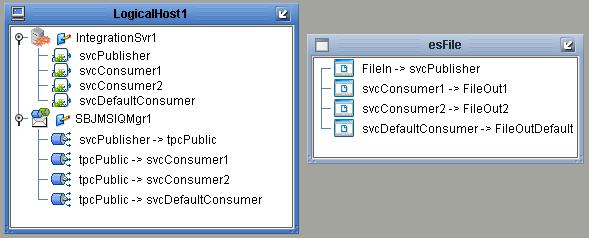
In the connectivity map there are four services:
* svcPublisher contains an instance of jcdPublisher
* svcConsumer1, svcConsumer2 and svcDefaultConsumer all contain a copy of jcdConsumer
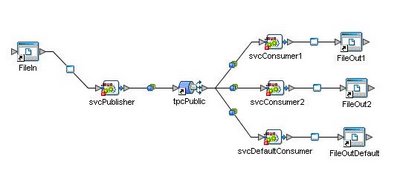
svcPublisher receives a file content from FileIn (File eWay instance) and publish it into tpcPublic topic. the three consumers receives messages after they are selected by message selectors.
In this toy example the input text file which triggers the process contains just a list of numbers:
message selectors are built so that they filter messages using the "dest" user property
Message Selectors
svcConsumer1 consumes only messages with an user property dest='1'

svcConsumer2 consumes only messages with an user property dest='2'

svcDefaultConsumer consumes only messages with the 'dest' user property that is neither '1' nor '2', so it can be expressed as

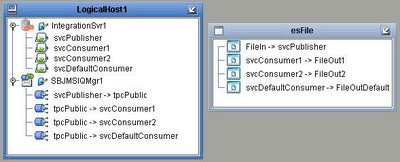
Deployment Profile
The DP maps project components present in a Connectivity Map to a given Environment
Results
Results are written in three distinct files: output1.txt (it will contains only '1'), output2.txt ('2') and outputDef.txt (contains all the other numbers that are not '1' or '2', present in input.txt)
Conclusions
What happens if one of the Connectivity Maps link does not contain any message selector? The obvious response is that the connected consumer would receive *all* the messages, regardless of the user property stored into the message header.
Publisher JCD
This JCD (Java Collaboration Definition in CAPS idiom) is triggered by a File eWay and publishes a JMS text message to a topic
public class jcdPublisher
{

    public com.stc.codegen.logger.Logger logger;

    public com.stc.codegen.alerter.Alerter alerter;

    public com.stc.codegen.util.CollaborationContext collabContext;

    public com.stc.codegen.util.TypeConverter typeConverter;

    public void receive( com.stc.connector.appconn.file.FileTextMessage input, com.stc.connectors.jms.JMS JMS_1 )
        throws Throwable
    {
        String content = input.getText();
        com.stc.connectors.jms.Message msg = JMS_1.createTextMessage();
        msg.storeUserProperty( "dest", content );
        msg.setTextMessage( content );
        JMS_1.send( msg );
    }

}
the line
msg.storeUserProperty( "dest", content );stores the user property that will be used later by message selectors to filter messages.
Consumer JCD
This JCD simply receives a text message from the JMS source (a topic, but it is not specified here but in the Connectivity Map) and writes it to a local file using the File eWay
public class jcdConsumer {

 public com.stc.codegen.logger.Logger logger;

 public com.stc.codegen.alerter.Alerter alerter;

 public com.stc.codegen.util.CollaborationContext collabContext;

 public com.stc.codegen.util.TypeConverter typeConverter;

 public void receive(com.stc.connectors.jms.Message input,
   com.stc.connector.appconn.file.FileApplication FileClient_1)
   throws Throwable {
  FileClient_1.setText(input.getTextMessage());
  FileClient_1.write();
 }

}
Connectivity Map
In the connectivity map there are four services:
* svcPublisher contains an instance of jcdPublisher
* svcConsumer1, svcConsumer2 and svcDefaultConsumer all contain a copy of jcdConsumer
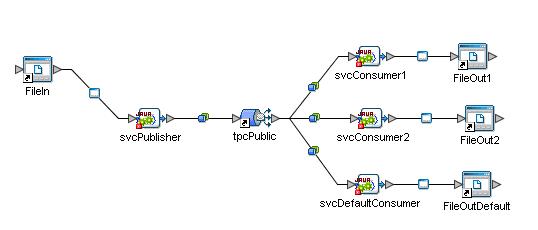
svcPublisher receives a file content from FileIn (File eWay instance) and publish it into tpcPublic topic. the three consumers receives messages after they are selected by message selectors.
In this toy example the input text file which triggers the process contains just a list of numbers:
4
1
2
2
1
2
3
1
message selectors are built so that they filter messages using the "dest" user property
Message Selectors
svcConsumer1 consumes only messages with an user property dest='1'
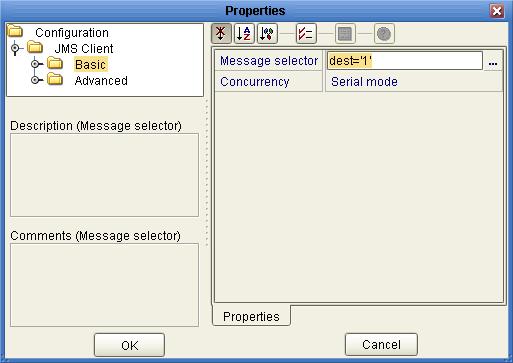
svcConsumer2 consumes only messages with an user property dest='2'
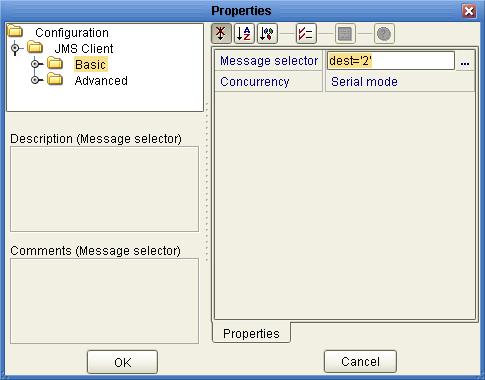
svcDefaultConsumer consumes only messages with the 'dest' user property that is neither '1' nor '2', so it can be expressed as
NOT (dest='1' OR dest='2')

Deployment Profile
The DP maps project components present in a Connectivity Map to a given Environment
Results
Results are written in three distinct files: output1.txt (it will contains only '1'), output2.txt ('2') and outputDef.txt (contains all the other numbers that are not '1' or '2', present in input.txt)
Conclusions
What happens if one of the Connectivity Maps link does not contain any message selector? The obvious response is that the connected consumer would receive *all* the messages, regardless of the user property stored into the message header.
Java CAPS - eInsight Business Processes Correlation HowTo
The Java Composite Application Platform Suite
The Java Composite Application Platform Suite (Java CAPS) allows companies to assemble large-scale applications built on existing systems and infrastructure. Java CAPS is an application-level network that unifies connectivity among people, application systems, and devices in different locations and across organizations. Business services facilitate the implementation of extended applications. Service oriented architectures (SOA) clarify design and enable reuse by sharing logic and data among different client systems and users.eInsight and Java CAPS
eInsight is a component of Java CAPS. eInsight delivers Business Process management features and functions to Java CAPS. Business Process management is a strategic orchestration of the movement of information and the flow of complex processes between participants (systems, users, and organizations) to accomplish larger business objectives. eInsight uses the standard BPEL language to describe processes1 Introduction
eInsight provides the means for matching existing Business Process instances to messages that are arriving into a Business Process. Correlation keys are individual data values contained within both the incoming message and the eInsight engine. When arriving messages contain data that matches the configured correlation keys, unique Business Process instances then continue processing on to the next step of a given Business Process.2 Message Correlations
A correlation key is a value that you can assign to a Business Process, like a Purchase Order number. The correlation key provides a way to associate and route information about specific Business Process instances. For asynchronous message exchange between components, you must implement correlation of the instance identification.An example of when you use asynchronous message exchanges is when you create a Receive Activity in the middle of a Business Process.
To have the correlation mechanisms working properly, right correlation keys are mandatory.
3 Example 1 - File trigger
In this scenario we have a calling process that sends a JMS message to another process and then waits for a reply, correlating instances through a unique ID.Invoked Process - bpReplier
The bpReplier process is called from the main one. It is very simple for this example: it just copies the Jms Correlation ID and adds some information in the text field.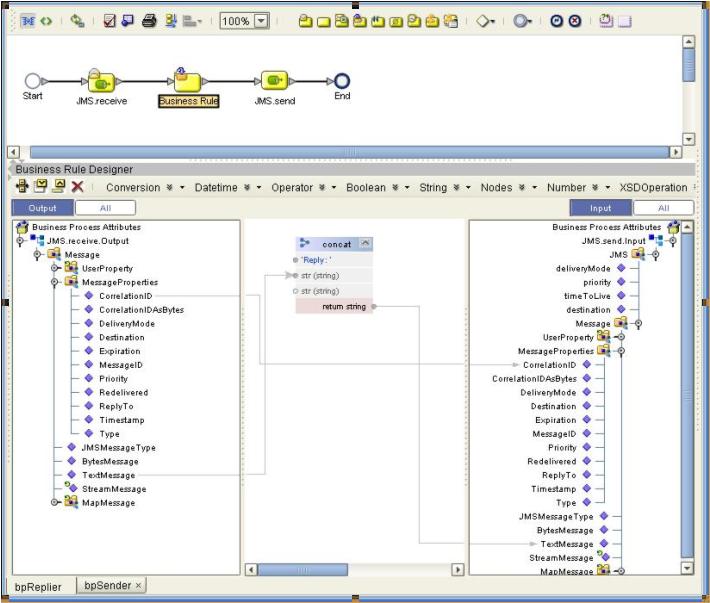
Main Process
The main process reads a correlation ID from a file, set it into the CorrelationID field of JMS->MessageProperties and then sends the message to the above mentioned bpReplier. An “Event Based Decision” waits for events: one it is a JMS.receive, second is a “Timer Event” in case nothing is received within a fixed amount of time.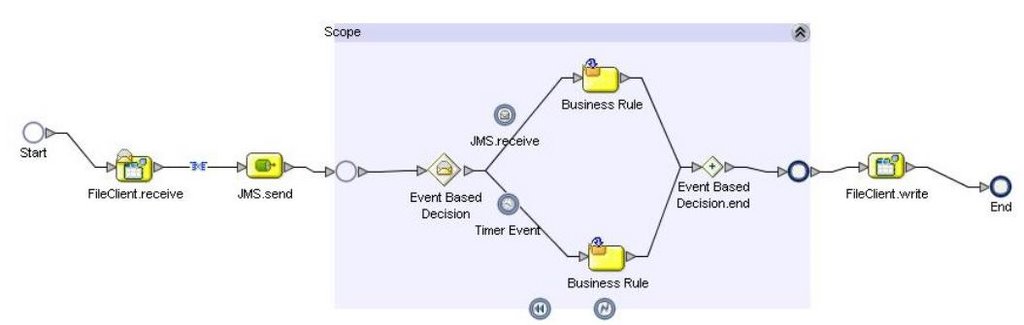
Correlation key
The correlation key is made of two aliases:* /Message/MessageProperties/CorrelationID
* /FileTextMessage/text

The correlation is used in two activities in the BP:
1 - FileClient.receive - with Initialize Set ='yes'
2 - JMS.receive (in the event based decision) - with Initialize Set='No'
4 Example 2 - JMS trigger
The second example shows how to use correlation in a process triggered by a JMS message instead of a file. The invoked service remains the previous simple "bpReplier", while the main process is slightly different.Main Process
In this case the main process is split in two: first the trigger, which reads from a file and uses its internal BPID as the CorrelationID for the JMS message:
Second, the “real” main process:

This receives the above message, initializes the correlation key, send a message to the bpReplier (copying the received CorrelationID) and the waits for an event. The JMS.receive, which uses the correlation key but does not initialize it, in the event based decision correlates inbound messages, while the usual Timer Event would raise a timeout in case of long inactivity.
In this case, as we only have one kind of inbound event (a JMS message is received) the only necessary alias for the correlation key is:
/Message/MessageProperties/CorrelationID
Resources
* Sun Java CAPS public forum* Product's official documentation
Subscribe to:
Posts (Atom)