A couple of years ago I wrote a blog entry about how to install the missing XML Schema Editor and related utilities from the dev update center in Netbeans 6.9. Now there is a unofficial update center:
http://deadlock.netbeans.org/hudson/job/xml/lastSuccessfulBuild/artifact/build/updates/updates.xml
It contains the development branches of these and instructions on how to install, thanks to Geertjan Wielenga.
I installed the plugin on Netbeans 7.1 [update: I installed it also in 7.2] and it seems to work, even if I did not test it intensively, primarily because these days I'm no more working that much with XML Schemas and WSDL files.
There is an apparently disabled Hudson project for the XML Tools. Now, if you want to put this nice plugin back into the regular plugin repository, please vote for this issue!
Showing posts with label Netbeans. Show all posts
Showing posts with label Netbeans. Show all posts
Saturday, April 7, 2012


Wednesday, September 22, 2010
JavaOne 2010, Glassfish and Netbeans
Despite the rumors and my own pessimism, it looks like there are plenty of Netbeans and Glassfish sessions at JavaOne 2010. From my point of view the combination of Netbeans + Glassfish and Java EE 6 is the easiest and quickest way to develop and deploy Enterprise-class Java (and Groovy) applications, without all those boring xml configuration files.
As reported by many observers, if we look at the apparently outstanding number of people trying to attend Gf and Nb sessions at Javaone, I think nobody can deny the fact that, contrarily to previsions, interest around both Glassfish and Netbeans is growing at great speed in the Java community.
As reported by many observers, if we look at the apparently outstanding number of people trying to attend Gf and Nb sessions at Javaone, I think nobody can deny the fact that, contrarily to previsions, interest around both Glassfish and Netbeans is growing at great speed in the Java community.
Tuesday, July 27, 2010
XML Schema and WSDL modules for Netbeans 6.9
*** UPDATE ***
The instructions below are still valid for Netbeans 6.9, but there is a new repository link for Netbeans 7.x, have a look here for more.
In the latest Netbeans releases, for some reason I can't understand, they removed the XML and WSDL plugin from the list of default available. This plugin is one of the best tools you have in Netbeans, as it allows to create and modify XML files, XML Schemas and WSDL files easily and graphically. It is a reduced version of what you get with Altova's XML Spy.
Browsing the Internet I have found a Netbeans repository from which I can install this plugin for Netbeans 6.9 also, what I did is to add a new Plugin download URL:
http://dlc.sun.com.edgesuite.net/netbeans/updates/6.9/uc/m1/dev/catalog.xml.gz
Then I added the new plugin center:

From where I can install some development plugins:

To know what it's possible with this plugin, have a look at: http://xml.netbeans.org/
I'd like to now if the URL above is the right one or there are different places from where it is possible to download updated releases of this.
The instructions below are still valid for Netbeans 6.9, but there is a new repository link for Netbeans 7.x, have a look here for more.
In the latest Netbeans releases, for some reason I can't understand, they removed the XML and WSDL plugin from the list of default available. This plugin is one of the best tools you have in Netbeans, as it allows to create and modify XML files, XML Schemas and WSDL files easily and graphically. It is a reduced version of what you get with Altova's XML Spy.
Browsing the Internet I have found a Netbeans repository from which I can install this plugin for Netbeans 6.9 also, what I did is to add a new Plugin download URL:
http://dlc.sun.com.edgesuite.net/netbeans/updates/6.9/uc/m1/dev/catalog.xml.gz
Then I added the new plugin center:

From where I can install some development plugins:

To know what it's possible with this plugin, have a look at: http://xml.netbeans.org/
I'd like to now if the URL above is the right one or there are different places from where it is possible to download updated releases of this.
Sunday, January 25, 2009
Tom Barrett's Open ESB and Mural Tutorials
Sun's Tom Barrett has produced a set of very well written and easy to follow tutorials, which can gently lead the reader toward a step by step introduction with many of the newest OpenESB related technologies, together with Netbeans and Glassfish. Good job Tom!
Tom Barrett's OpenESB Tutorials
Tom Barrett's OpenESB Tutorials
Saturday, September 13, 2008
Sun Releases Milestone 1 for GlassFish ESB
Today Sun made the public release of Milestone 1 for GlassFish ESB.
"GlassFish ESB is a binary distribution of OpenESB. It consists of subset of the components in OpenESB. Sun will provide commercial support for GlassFish ESB."
GlassFish ESB delivers a lightweight and agile ESB platform that packages the innovation happening with Project OpenESB into a commercially supported, enterprise-class platform. In essence, GlassFish ESB is a binary distribution that combines technology from Project OpenESB, the GlassFish application server and the NetBeans IDE communities into a supported, commercial distribution.
"GlassFish ESB is a binary distribution of OpenESB. It consists of subset of the components in OpenESB. Sun will provide commercial support for GlassFish ESB."
GlassFish ESB delivers a lightweight and agile ESB platform that packages the innovation happening with Project OpenESB into a commercially supported, enterprise-class platform. In essence, GlassFish ESB is a binary distribution that combines technology from Project OpenESB, the GlassFish application server and the NetBeans IDE communities into a supported, commercial distribution.
- GlassFish ESB is a binary distribution from the open source bits in OpenESB.
- Sun will support GlassFish ESB just like any other product: it will not just support the latest version, but also older versions. Once released, fixes to GlassFish ESB will be made on a branch behind the firewall and will be merged periodically to the head of the OpenESB code repository. This is an important point for customers who don’t like to continuously upgrade in production.
- Sun will continue to develop in open source on the OpenESB head.
- GlassFish ESB will be released on Dec 5th; there will be two more milestone releases in between.
- The GlassFish ESB site will soon live on sun.com. There are a few pages for GlassFish ESB on OpenESB just temporarily. We’re trying to separate the commercial aspects (i.e. GlassFish ESB) from OpenESB as much as possible: OpenESB is and should remain an open source community.
- The GlassFish ESB downloads will remain on OpenESB because the bits are being developed in Open Source.
- This does not change anything for the ESB Suite, MDM, and JavaCAPS: we will continue to develop them. There is and will remain a value differentiation between GlassFish ESB and the other products.
- There will be separate component releases next to GlassFish ESB. E.g. IEP will release soon as a separate component.
- A flexible platform supporting multiple architectural styles (SOA, EJB, MoM, BPM)
- Modular architecture enabling a tailored solution platform for specific project and enterprise needs.
- Leading SOA and WS-* (WS-IT/Metro) support with industry leading interoperability with other platforms
- Integration tooling, based on the award-winning NetBeans IDE with integrated service development, deployment and testing
- Support for JBI, Java EE 5 and a wide range of other key industry standards
- Based on fully open communities Project OpenESB, GlassFish and NetBeans
- Backed by Sun's software support services
- Backed by a large and growing community with an exciting roadmap and future vision
Monday, March 17, 2008
Will Java CAPS 6 be based on Netbeans 6.1 ?
Rumors are that the next generation of Java CAPS will be based on a new Netbeans version. No more fights with the eDesigner, eventually. ICAN 5.0 and JCAPS 5.1 IDEs were based on a very old Netbeans (v 3.5) heavily customized by SeeBeyond, called the eDesigner. Additionally jcaps 6 JEE runtime is going to be Glassfish, the Sun open-source application server (at present jcaps runs over old SJAS 8.0).
For seasoned jcaps developers, used to workaround some eDesigner's weird behaviors, it will be a huge improvement, as Netbeans 6 represents probably the most advanced Java IDE in the market (and yes, I mean even better than Eclipse). Glassfish then is one of the best JEE 5 and EJB 3 implementation available, this means Java CAPS 6 is evolving to a complete and powerful Java enterprise application development environment, not limited to EAI only. That shows a strong Sun's commitment in favor of jcaps, good for both partners and customers.
For seasoned jcaps developers, used to workaround some eDesigner's weird behaviors, it will be a huge improvement, as Netbeans 6 represents probably the most advanced Java IDE in the market (and yes, I mean even better than Eclipse). Glassfish then is one of the best JEE 5 and EJB 3 implementation available, this means Java CAPS 6 is evolving to a complete and powerful Java enterprise application development environment, not limited to EAI only. That shows a strong Sun's commitment in favor of jcaps, good for both partners and customers.
Friday, December 1, 2006
JUnit testing JMS systems with Netbeans and Mockrunner
Scenario
You are developing a JMS-based application and you want to use those nice test-driven development habits that you have learned are so good in keeping your code clean and bug-free, but sending messages to a real JMS server is slowing down your edit - compile - test process. First because you always need to remember to start your JMS server each morning, second because running JUnit against the real system is a bit slow. Maybe you have an external server hosting your JMS server, so the first point does not apply to you, but in my case I use to run everything on my laptop, so it does matter.
A mock JMS implementation
Here is where Mockrunner comes in the scene.
"Mockrunner is a lightweight framework for unit testing applications in the J2EE environment. It supports servlets, filters, tag classes and Struts actions and forms. Furthermore it includes a JDBC, a JMS and a JCA test framework and can be used in conjunction with MockEJB to test EJB based applications.
Mockrunner extends JUnit and simulates the necessary behaviour without calling the real infrastructure. It does not need a running application server or a database. Furthermore it does not call the webcontainer or the Struts ActionServlet. It is very fast and enables the user to manipulate all involved classes and mock objects in all steps of the test. It can be used to write very sophisticated unit-tests for J2EE based applications without any overhead. Mockrunner does not support any type of in-container testing."
Actors
- Netbeans 5.5
- Java CAPS 5.1 default JMS server
- Mockrunner
Setup
Download the mockrunner-0.3.7.zip file and unzip it somewhere. Then you need to setup your Netbeans project to make use of Mockrunner's libraries.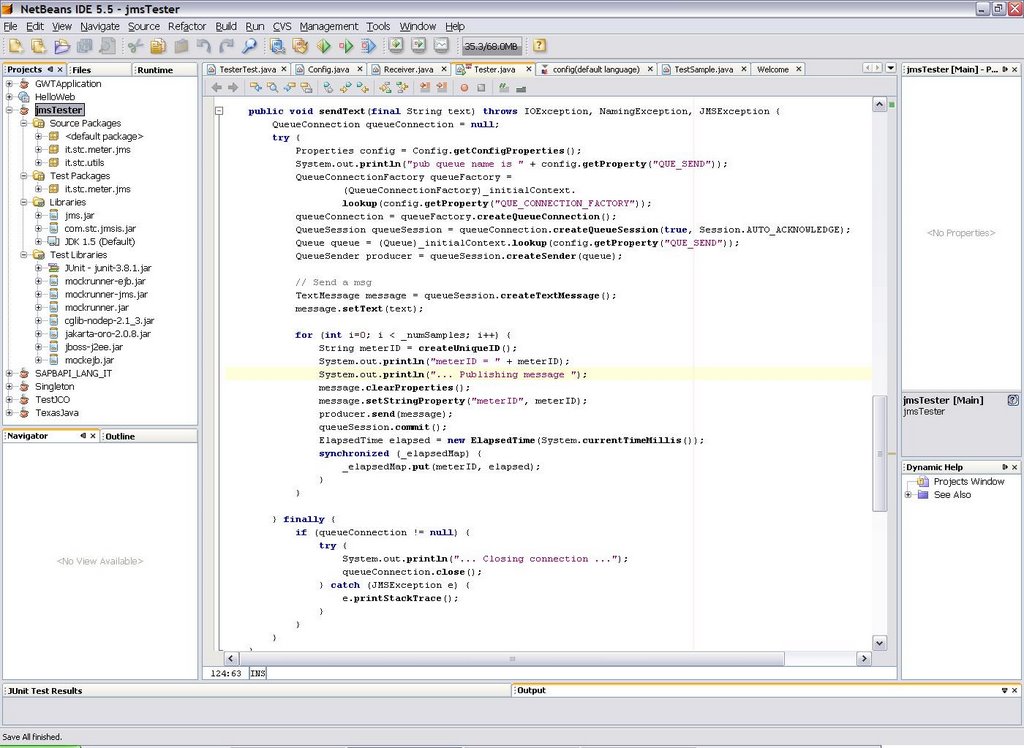
Add Mockrunner libs to your project's test library by right-clicking the libraries node in your project and selecting "Properties"
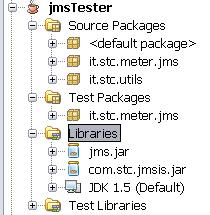
In my case I'm connecting to CAPS JMS server, so I need both jms.jar and com.stc.jmsis.jar files. The latter is part of the CAPS eGate APIkit distribution and allows to connect to Sun SeeBeyond JMS server implementation from a generic Java client: you need to put here your specific JMS server client libraries. My intention is to run my custom Java application against the real JMS server (as said, in my case it is CAPS), but to run automatic JUnit tests against the mock implementation.

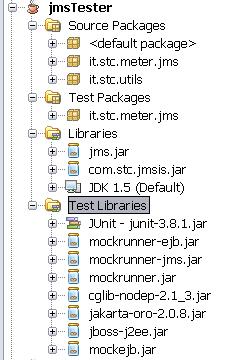
Now add Mockrunner's necessary libraries to the "Compile-time Test Libraries" tab:

The final result should looks like the picture below:
A simple test-case
Here I show a simple test for the "sendText" method of my class which uses Mockrunner's stubs. Mockrunner internally uses MockEJB libraries to simulate a J2EE container:/*
* TesterTest.java
* JUnit based test
*
* Created on 28 November 2006, 17:33
*/
package it.stc.meter.jms;
import com.mockrunner.ejb.EJBTestModule;
import com.mockrunner.jms.JMSTestCaseAdapter;
import com.mockrunner.mock.jms.MockQueue;
import it.stc.utils.Config;
import java.io.IOException;
import java.util.List;
import javax.jms.JMSException;
import javax.jms.TextMessage;
import javax.naming.InitialContext;
import javax.naming.NamingException;
public class TesterTest extends JMSTestCaseAdapter {
private EJBTestModule _ejbModule;
private MockQueue _queIN;
private MockQueue _queOUT;
private InitialContext _initialContext;
public TesterTest(String testName) {
super(testName);
}
protected void setUp() throws Exception {
super.setUp();
_ejbModule = createEJBTestModule();
_ejbModule.bindToContext("connectionfactories/queueconnectionfactory",
getJMSMockObjectFactory().getMockQueueConnectionFactory());
_queIN = getDestinationManager().createQueue("quIN");
_queOUT = getDestinationManager().createQueue("quOUT");
_ejbModule.bindToContext("queues/quIN", _queIN);
_ejbModule.bindToContext("queues/quOUT", _queOUT);
_initialContext = new InitialContext();
}
protected void tearDown() throws Exception {
}
public void testSendText() throws IOException, NamingException,
JMSException {
final String text = "prova";
final int numSamples = 3;
Tester m = new Tester(_initialContext, numSamples);
m.sendText(text);
verifyNumberOfReceivedQueueMessages("quIN", 3);
List receivedMessages = getReceivedMessageListFromQueue("quIN");
for (Object message : receivedMessages) {
assertEquals(text, ((TextMessage) message).getText());
}
verifyNumberQueueSessions(1);
verifyAllQueueSessionsClosed();
verifyQueueConnectionClosed();
verifyAllQueueSessionsCommitted();
}
}
Conclusions
This article briefly shows how to setup Netbeans to make use of Mockrunner to test JMS clients without the need to connect to the real JMS server. In a future article I'll go deeper on the CAPS JMS server facts and I'll show how to apply this scenario to create automatic JUnit test cases for EAI flows built in SeeBeyond ICAN 5.0 or Sun CAPS 5.1. Automatic testing of EAI solutions is usually sligthly more complex than testing normal applications.
Subscribe to:
Posts (Atom)